某开源堡垒机的数据库默认密码及iptables访问限制绕过

这是比较久之前发现的问题了,官方已经知晓,这么长的周期下应该也已经修复了,这个堡垒机号称是开源的堡垒机吧,只要下载ISO直接安装就行,自带系统,默认已经有配置了,我测试的也主要是默认配置这种情况下的堡垒机,堡垒机的系统我们是可以登录进去的,我只是利用这种方式快速的发现并验证通用的问题。虽然说是“绕过访问限制”,但是实际上是利用了他们的IPV6相关配置缺陷而已,作为一种拓展的思路分享给大家,毕竟现在
这是比较久之前发现的问题了,官方已经知晓,这么长的周期下应该也已经修复了,这个堡垒机号称是开源的堡垒机吧,只要下载ISO直接安装就行,自带系统,默认已经有配置了,我测试的也主要是默认配置这种情况下的堡垒机,堡垒机的系统我们是可以登录进去的,我只是利用这种方式快速的发现并验证通用的问题。虽然说是“绕过访问限制”,但是实际上是利用了他们的IPV6相关配置缺陷而已,作为一种拓展的思路分享给大家,毕竟现在国家开始推行IPV6了,以后IPV6相关的安全问题可能会越来越受到重视吧。
我们先使用官方的ISO安装两台测试机,看安装后数据库的密码是否是随机生成的,这样比较快(几分钟而已),也省了要分析他的安装脚本,还可以同步确认是否存在默认密码
测试机1:
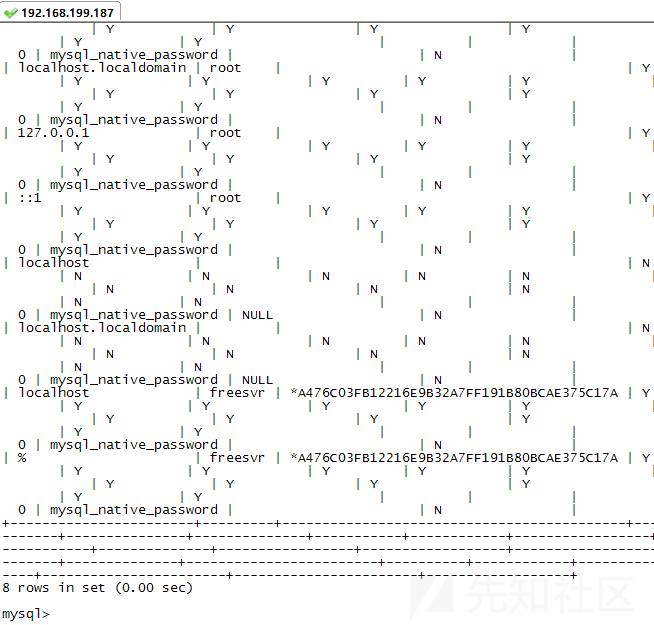
测试机2:

可以很明显的看到,freesvr的用户密码是没有变化的。
都是freesvr/freesvr,而且访问限制给的是%,也就是没有限制。但是root账户只能本地
嗯,那问题来了,在默认安装的情况下,我们是否可以直接访问数据库呢?
先看看几个简单的测试:
telnet 3306端口

用工具连了试试?

难道改了端口号?其实没改,我们先用netstat看看:

看到了吧?3306
一想就知道,是iptables做了限制。可以先看看iptables的规则是怎么限制的:
Chain RH-Firewall-1-INPUT (2 references)
target prot opt source destination
ACCEPT all -- anywhere anywhere
ACCEPT udp -- anywhere anywhere udp dpt:ntp
ACCEPT udp -- anywhere anywhere udp dpt:snmp
ACCEPT udp -- anywhere anywhere udp dpt:syslog
ACCEPT udp -- anywhere anywhere udp dpts:radius:radius-acct
ACCEPT icmp -- anywhere anywhere
ACCEPT all -- 10.11.0.0/16 anywhere
ACCEPT all -- 172.16.210.2 anywhere
ACCEPT all -- anywhere base-address.mcast.net/8
ACCEPT vrrp -- anywhere anywhere
ACCEPT all -- anywhere anywhere state RELATED,ESTABLISHED
ACCEPT tcp -- anywhere anywhere state NEW tcp dpt:netml
ACCEPT tcp -- anywhere anywhere state NEW tcp dpt:https
ACCEPT tcp -- anywhere anywhere state NEW tcp dpts:ms-wbt-server:savant
ACCEPT tcp -- anywhere anywhere state NEW tcp dpts:ftp-data:telnet
ACCEPT tcp -- anywhere anywhere state NEW tcp dpt:ddi-tcp-1
ACCEPT tcp -- anywhere anywhere state NEW tcp dpt:pcsync-https
REJECT all -- anywhere anywhere reject-with icmp-host-prohibited
有看出什么问题?貌似是有限制的?
仔细想想,先看看刚才圈出来的

你没有看错,3306只有这一条监听,而且是tcp6!也就是ipv4和ipv6都可以用3306端口!
而iptables是什么?针对ipv4的防火墙,如果想对ipv6做限制,必须安装ip6tables!
先看看系统是否有安装吧

嗯,有功能,没有规则……知道咋回事了?
限制了IPV4,我们还可以用IPV6!
但是挺多工具都不支持ipv6,如Navicat:

还是老老实实用命令行的mysql吧。在使用前,先ping几次还有telnet几次这个ipv6地址,让路由可以连通先
利用常规的命令 mysql –h ipv6地址 –ufreesvr -pfreesvr,可绕过iptables的限制


可以直接读取管理员密码(有脚本可解密):

可以读文件,但可惜还不能写shell,没有权限:

至于如何通过一个IPV4的地址获取他的IPV6地址,可能得靠各位大佬继续研究了